Tip Taper
Tip Taper shapes the free ends of a stroke — the tips — without touching the body. It replaces the ending inside the tip zone with the shape you pick (anchored to the body width where the zone starts), so it overrides whatever ending the line already had. It's non-destructive — the stored vector width is never modified, so clearing it restores the original line exactly.
Start & End shapes
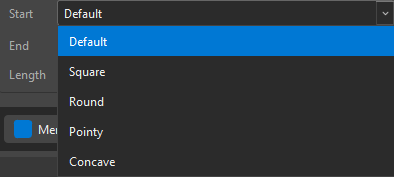
Each free end (Start and End) gets its own shape, chosen independently from the combo:
- Default — this is the default. Leaves the line's own ending untouched — no reshaping at all.
- Square — a flat cap: full width held right to the very tip, cut off square with sharp corners.
- Round — a true semicircular cap.
- Pointy — tapers linearly to a point (a triangular spike).
- Concave — sides curve inward — a flared, calligraphic needle.
Length
The Length slider sets how far up the stroke the tip zone reaches, as a fraction of the stroke's arc length. At 0% nothing happens — that's the default, no taper. A small length carves just the very tip; a longer one eases the shape in over a bigger stretch. (Square ignores the carve — the whole zone becomes the flat cut; Round uses its natural semicircle radius; Pointy/Concave spike over the full zone.)
Only free ends taper
Taper applies to free ends only — a tip that's shared with another stroke (a junction) stays full-width, so a line that continues into another line doesn't pinch in the middle. OVB detects which ends are free after junction pinning, so the taper never fights the shared-width logic.
Applied live, not baked
The tip shape is applied at draw and write time — the original vector width is never modified. Set Start/End back to Default (or Length to 0) and the stroke returns to its natural ending, exactly as imported.
Match your brush
Round tips read as a soft marker; pointy tips as an inked brush; concave as a calligraphy nib. Pick the pair that matches the look of your source line, then set the Length to taste.