Occlusion
Line art drawn in 3D has a problem 2D doesn't: strokes that should be hidden behind other geometry. OVB culls them at export, so the exported line contains only what the camera would actually see — the thing Blender's native SVG exporter can't do.
Occlusion is a Grease Pencil feature. Pencil+ occludes itself (see below).
How it works
OVB raycasts from the camera to each stroke point. A point that a solid mesh blocks between it and the camera is culled.
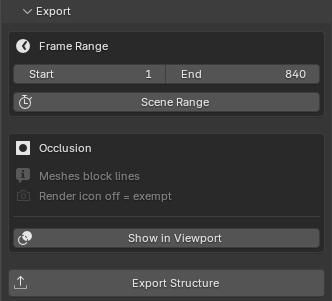
One rule: every solid mesh blocks lines. To exempt a mesh — so it never occludes — turn off its render icon (the camera icon in the Outliner). A mesh disabled for render does not block anything; a ray passes straight through it to whatever is behind. That is the whole mechanism: "this must not block my lines" is a gesture Blender already has, not a second vocabulary borrowed from compositing.
What gets raycast, and what comes out as-is
OVB decides this automatically, per (object, layer).
A Grease Pencil Line Art modifier declares a target layer. Layers that a Line Art writes to have already had their hidden lines removed by the generator, so OVB exports them as-is — re-testing them with the raycast would only nibble the tips of chains at grazing angles. Every other layer gets the raycast.
The one exception is a layer you drew on by hand that is also a Line Art target. OVB can't separate hand-drawn strokes from generated ones once the object is evaluated, so that mixed layer joins the raycast side. Hand-drawn art showing through a wall is a plain error to avoid; a re-tested Line Art loses only a little at the chain tips.
| Layer content | Treatment |
|---|---|
| Written by a Line Art (target layer, no hand strokes) | Exported as-is (Line Art already removed hidden lines) |
| Hand-drawn / plain art | Raycast against solid meshes |
| Line Art target the artist also drew into | Raycast (the safe side) |
Per-pass opt-out
A Grease Pencil pass has an Export as-is (never hide) checkbox in its Content panel. Tick it and that pass skips occlusion entirely — the art ignores the scene. Use it for things that are meant to read on top regardless of geometry: speed lines, x-ray notes, annotation. See Structure & Subartlayers.
Preview it before you commit
Show in Viewport draws a WYSIWYG overlay of the exact classification: kept strokes vs culled strokes, in the viewport. Because the overlay and the export share one code path, the preview can never disagree with what the frame range will produce. Confirm the cull is right on one frame before exporting a whole sequence.
Tuning the raycast
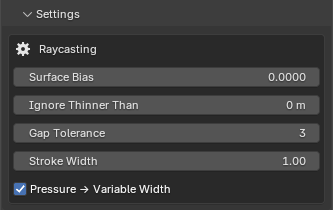
Two controls keep grazing surfaces from occluding lines that lie on them (self-occlusion / "acne"):
- Surface Bias — shortens the occlusion ray slightly toward the camera so a stroke sitting on a surface isn't blocked by that same surface. It is scale-independent (relative to camera distance), and the margin is more forgiving at grazing angles than face-on, so genuinely hidden lines stay hidden.
- Ignore Thinner Than (the sliver test) — where a surface turns away from the camera, a ray can clip a paper-thin sliver of solid that no bias can separate from real occlusion. This control measures how much solid the ray actually crosses: an obstruction thinner than the set thickness is walked through, while a ray that crosses thick solid stays occluded.
0switches it off. - Gap Tolerance — how many culled points in a row a stroke may bridge before it is cut in two. Raise it to keep a stroke whole across a hairline occluder; lower it for a strict cut.
They live in the Settings card, with Stroke Width and Pressure → Variable Width. Leave the raycast controls at their defaults unless you see lines dropping out along surfaces they belong to.
Pencil+
In Pencil+ mode, both line generation and occlusion are handled by Pencil+ itself through its Line node — OVB exports what Pencil+ produced. Configure culling in the Pencil+ setup, not in the OVB panel. The OVB occlusion controls above apply to Grease Pencil only.