Stroke Thickness & Pressure
Harmony pencil lines carry a thickness profile — a width that varies along the stroke. OVB rebuilds that profile from your source's pressure data and shows it live in the Previewer. The Stroke Thickness card is where you shape it.
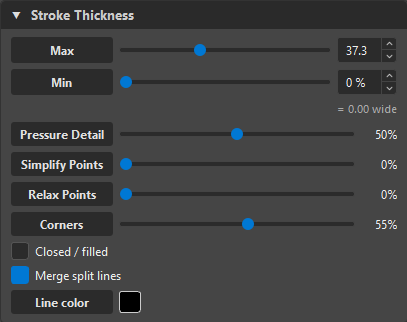
The width envelope
- Max — the widest the line gets (the peak of the pressure profile), an absolute width.
- Min — the thinnest, stated as a percentage of Max (with the absolute width it lands on shown beside it). Set Min = 0 % for lines that taper to nothing; raise it for a floor width.
The source's pressure profile is remapped into the [Min, Max] envelope, so a stroke that was thin-to-thick in Blender stays thin-to-thick in Harmony — just scaled to your chosen range. The same width renders identically on every frame, so there's no cross-frame bleed.
Min is a percentage, like Harmony's pencil
Harmony's own pencil states its minimum as a percentage of the maximum, so OVB does too — the thin end is that fraction of the thick end. It keeps the taper WYSIWYG with the pencil line Harmony draws.
WYSIWYG width
The Previewer uses the exact same width model the import writes — the source profile re-parameterised by arc length along the stroke's final geometry. What you preview is what lands, at any Detail or smoothing.
Pressure Detail
Pressure Detail controls how many pressure points (thickness keys) OVB fits along the stroke:
- Higher — more keys, a closer match to the raw profile (every little bump preserved).
- Lower — fewer keys, a cleaner, more editable profile in Harmony.
The keys are placed at the profile's peaks with fitted cubic handles, then spacing-pruned so you get a faithful but sparse set — the same three keys you'd draw by hand, not a hundred.
Pressure points
Turn on the Points overlay in the Previewer to see them: the red dots are the pressure keys that reach Harmony. Where two source strokes meet (an eye exported as two paths), OVB pins the shared endpoint to the same width on both sides, so the lines join cleanly instead of one being thin-bottom and the other thick-top.
Exact pressure from Harmony-pulled art
When you re-edit art that already carries pressure keys (pulled from an existing Read node), OVB shows those keys as-is — three keys in Harmony stay three keys here — instead of re-fitting them. Painting a Pressure brush hands control back to the fit.
Halves
Harmony renders a stroke's left and right widths summed, so OVB writes each side as half the total width. You never think about this — it's just why the numbers land right.
Where it doesn't apply
Thickness is a line-art concept. Fills (Colour Art) ignore width; a bitmap import has no vector strokes to profile. For raster line art, see the Blender Pencil+ hybrid which reconstructs width from the render.