AutoPivot
AutoPivot puts each peg's pivot where the artwork actually is, and keeps every frame where the artist drew it.
It runs as the last phase of Assemble, and it is on by default — the AutoPivot checkbox in the Browser's Settings section, or in Preferences.
The problem it solves
Import artwork into Harmony by hand and every peg's pivot lands at the origin — the middle of the camera — regardless of where the drawing is. Rotate an arm and it swings around the centre of the scene instead of around the shoulder.
Fixing that by hand is one drag per peg, on every peg, in every scene.
Phase A — the tournament
At frame 1, OSA builds the peg hierarchy out of the nodes it just created, walking through groups and composites to find each peg's real subtree.
At every peg, the child subtree with the largest bounding-box area wins, and its centroid becomes the peg's pivot.
Largest-area is not arbitrary: in a rig, the thing a peg is for is almost always the biggest thing under it. The head peg's biggest child is the head; the arm peg's is the arm. Picking the largest subtree gets the pivot onto the artwork that peg exists to move.
Only nodes OSA created are considered. Nodes that were already in the scene are left alone — AutoPivot never edits somebody else's rig.
Phase B — per-frame compensation
Here is the part that matters for animation.
When artwork is extracted, every frame is centred at the reference position (frame 1). That is what makes the pivot from Phase A correct for the whole sequence — but it also means frames 2 and onward would sit at frame 1's position, not their own.
So Phase B computes, per frame, the peg position delta that puts each frame's artwork back exactly where it was in the original PSD:
- it uses the pixel → OGL calibration recorded during extraction, so the maths is in the scene's own units;
- parent pegs move first, top-down, and each child subtracts the inherited parent delta — it applies only the residual, so a nested rig does not double-count its parents' movement;
- only position.x / position.y are animated. Never rotation, never skew: AutoPivot exists to preserve placement, not to invent motion;
- every keyframe is step interpolated (
constSeg), so there is no drift between exposures — a held drawing does not slide.
Excluding a peg
Tick Exclude AutoPivot on the Peg block in the Inspector, and that peg's pivot is left exactly as it is.
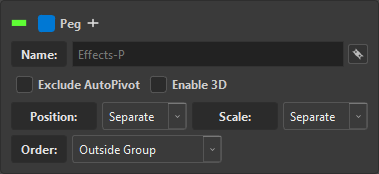
This is set automatically on every peg coming from a .anm or .pvt file, because those pivots belong to the bake and overwriting them would break the animation you just imported. See Transform Sync.
Use it by hand when a peg's pivot is a deliberate art direction — a swinging sign that pivots at its bracket rather than at its centre of mass.
In Original Bitmap mode
The crop is the normalisation. A drawing in Original Bitmap has no art layers, and the pass that crops the exposure is the same pass that normalises it for AutoPivot — one operation, not two.
That is why the mode is cheaper on big plates: there is no separate normalisation step over a 30 000-pixel image.
When it does nothing
| Situation | Why |
|---|---|
| No drawing nodes with exposures | there is no bounding box to measure |
| Every peg is excluded | nothing to compute |
| The peg was not created by OSA | AutoPivot only touches its own nodes |
Each of these is a log line, not a silent no-op — if pivots did not move, osa.log says which of the three it was.