Super Nodes
A super node is one staging row that expands into a whole self-contained unit in the Node View.
SuperNode = BD-P-G-D-C   →   BD
                             └── P
                                 └── G
                                     ├── C   ← eldest sibling
                                     ├── D   ← middle sibling
                                     └── [the tree's children]
One row in Staging. Five nodes in Harmony, wired, named and boxed.
What one looks like in the tree
A slot's icon is one glyph carrying every component it builds. This is a full super node — BD-P-G-D-C with an effect chain:
**Peg**
**Group**
**Drawing** (Read)
**Composite**
the **effect chain**
Three things to read off it:
- The bands are in wiring order, left to right — swap Peg Order and the first two swap places, and the glyph changes with them.
- The backdrop is the plate, not a band. It draws a box; it owns no connection. (Which is also why it never changes who aggregates what.)
- The effect badge is the same cyan bar for all five effects. An icon that does not distinguish is decoration, so the chain gets one mark and the Inspector gets the detail.
The full set of sixteen combinations is in Icons & Indicators.
What it is for
Reading. A 300-node scene has maybe 25 things a human thinks about — a character, a prop, a background plate. The super node is how the tree shows you those 25 instead of the 300.
Renaming. Rename the row and every node that belongs to it follows: Can becomes Ship and you get Ship, Ship-P, Ship-G, Ship-C, Ship-BD in one edit. There is no pass where you hunt down the four related nodes and hope you got them all.
Scope. The green container (P, G or BD) creates a real hierarchy scope, so the composite inside it aggregates that content and nothing else. Things that belong together move together.
Sibling order inside the container
Inside the green container — the group, in the example above — the order of siblings is fixed, and it is not arbitrary:
C(Composite) — the eldest sibling. It aggregates everything below it.D(Drawing) — the middle sibling.- The tree's children — the youngest siblings, aggregated by that
C.
Reading it aloud: the composite is first so that everything that comes after it flows into it.
And the comp collects the children up to the first child that is itself a comp — that one opens a new block and takes everything after it. See Aggregation & The Sibling Aggregator.
Inside or Outside the group
The Composite's Order decides where it lives relative to the group, and the two readings are genuinely different:
| Order | Where the comp sits | What it receives |
|---|---|---|
Inside Group |
inside G |
the outputs of its siblings from the inside, putting its own output on the group's MPO up to the next output connection |
Outside Group |
outside G |
the outputs of the younger siblings from the outside, through the group's MPO |
Set it on the Composite block in the Inspector. The same choice exists for the Peg (Inside Group / Outside Group), which is what swaps peg and group in the chain.
Building one
There is nothing special to switch on — a super node is just a slot with several components ticked. Three ways:
By tag, before the import:
hero=BD-P-G-C
In the Inspector, by ticking Backdrop, Peg, Group and Composite on the slot.
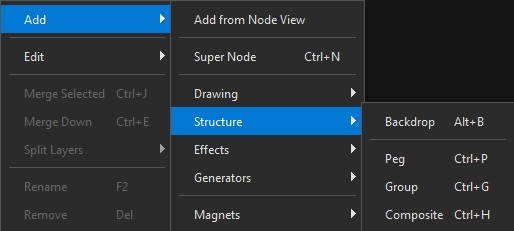
From the context menu — right-click → Add → Structure, which offers the same components:
Reading it back
The Details column spells the whole unit out in wiring order, so you never have to expand a row to know what it will build:
BACKGROUND      (Backdrop > Peg > Comp)
PROPS           (Backdrop > Peg > Comp)
  Can           (Peg > Read > Comp)
CHARACTER       (Backdrop > Peg > Comp)
EFFECTS         (Backdrop > Peg > Comp > Effects)
And in the Node View, the Wide Bus places it: masters on the top row, content on the middle row, the composite below what it aggregates, and the effects strip reserved underneath.
Taking one apart
Split breaks a super node back into its parts — see Split & Merge. The two split modes decide whether the pieces come out nested (hierarchical) or flat (siblings), which is exactly the choice you want when a slot turned out to be carrying two ideas at once.