Tags
A tag is a piece of a name that OSA reads as an instruction.
sky=P-C is not a drawing called "sky=P-C". It is the drawing sky, plus a peg called sky-P, plus a composite called sky-C — three nodes, from one name you typed before the import.
This is the highest-leverage habit in the tool. Every tag you write before staging is a node you don't build after it.
Try it
Type a name the way you would write it in Photoshop or in Windows, and see what OSA would build.
The decoder follows the same rules as the parser inside OSA — the same vocabulary, the same right-to-left reading, and the same refusal to treat a bare number as a depth.
Where you can write a tag
The parser doesn't care where the name came from. The same string means the same thing in all three places:
| Where | Example | Read when |
|---|---|---|
| A Photoshop layer or group name | head=P-G-C |
you import the .psd |
| A Windows folder or file name | BACKGROUND=BD |
you drag the folder in |
| A row in the Staging tree | rename it in place | immediately |
This is why the convention pays
Your PSD already has layer names. Naming a Photoshop group arm=P-G costs you nothing at paint time and saves you a peg, a group, a rename and two connections at build time — per arm, per character, per scene.
The two ways to write one
Suffix form — hyphen-separated, read right to left:
head-P-G-C
Equals form — everything after = is the tag list:
head=P-G-C          the usual way
head=P,G,C          commas work too
head=P G C          so do spaces
Both give the same result. The equals form is safer when the name itself contains hyphens, because the parser stops looking as soon as a piece is not a valid tag: in two-part-name-P only P is taken, and the drawing keeps the name two-part-name.
The inverted form
CA=Head also works — a tag on the left and the name on the right. It exists because it is how some art departments already write art-layer prefixes. CA=Head and Head=CA produce exactly the same slot.
Structure tags
-

P— Peg
Adds a Peg named
<name>-P. Whether it sits above or below the group is the Peg Order setting, not the tag. -

G— Group
Adds a Group named
<name>-G. A group is what makes the slot a self-contained unit in the Node View. -

C— Composite
Adds a Composite named
<name>-C. This is what the children connect into, and what the effect chain hangs off. -

D— Drawing
Forces a Read node. The only implicit tag: a file with artwork already gets a drawing, so you rarely type
D— you type it when you want an empty drawing on a row that would otherwise be a plain container. -
BD— Backdrop
Wraps everything below in a Node View backdrop named after the slot. Backdrops nest — see The Wide Bus.
-

PIVOT
Marks the slot as carrying pivot data rather than artwork.
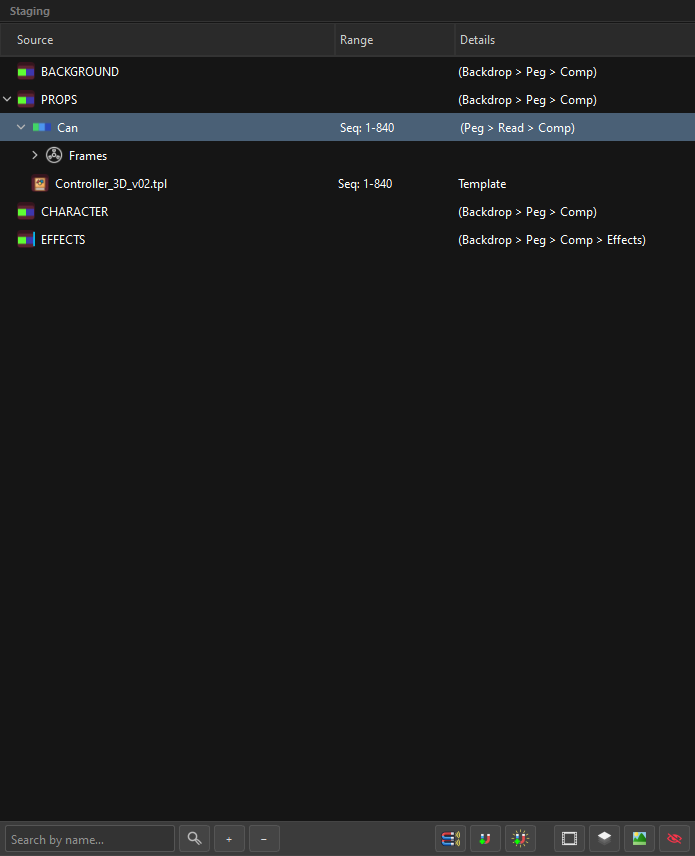
Combine them freely: head=P-G-C builds all three. The Details column always shows you what you asked for, in wiring order:
Art layer tags
These say which internal layer of the drawing the artwork goes into.
| Tag | Art layer | Chip |
|---|---|---|
UL |
Underlay |  |
CA |
Colour Art |  |
LA |
Line Art |  |
OL |
Overlay |  |
So a Photoshop file painted as line=LA, flats=CA, shadow=OL arrives as one drawing with three of its four art layers filled, instead of three separate drawings you then have to merge by hand.
Untagged artwork goes to Line Art — that is the default the whole app agrees on.
See Drawings, Art Layers & Subart for what happens when two images claim the same art layer.
Effect tags
An effect tag attaches the effect to the slot, already wired after the composite.
Effects share one mark, and that is the point. In the tree an effect row shows no icon of its own — it gets the cyan bar above, in the icon column, pushed against its right edge. A peg looks like a peg and a group looks like a group because those are different things; ten effects with ten little glyphs would be ten shapes to learn that all mean the same thing: something is wired after the composite here. Which effect it is, the row already says in words.
| Tag | Effect |
|---|---|
OP |
Transparency |
CUT |
Cutter |
BLD |
Blending |
GLW |
Glow |
BLR |
Blur |
OP50 also works — a Transparency at 50. Any effect in the table can be tagged, including the colour filters (BC, HS, LVL, TONE, HL), because the tag list is generated from the same table the Inspector reads. An effect added to OSA becomes a valid tag on the day it is added.
See Effects.
Generator tags
| Tag | Generator |
|---|---|
CC |
Colour Card |
GRD |
Gradient |
These are structural, not effects: bg=CC says "this node is a Colour Card", the same way =P says "this node is a peg". See Generators.
Z-depth tags
A number pushes the slot forward or back in the composite order.
| Form | Meaning |
|---|---|
Z0.1 |
z-depth 0.1 |
0.5F |
0.5 forward |
10B |
10 back |
A bare number is not a tag — 1 and 0.1 are ignored on purpose, because sequence files are full of bare numbers and a frame called 0007 must never become a depth instruction. Write Z in front, or F/B behind.
Z-depth needs a peg
Z-depth is written on the peg, never on the drawing — so with no peg there is nowhere to write it. This is not a rule of the interface that a tag could sneak past; it is the absence of a destination. A transform on the Read would give the drawing animation of its own, which breaks the one convention the whole app rests on: the peg drives everything.
A peg counts as present when it is:
- on the slot itself —
sky=P-D, the peg and the drawing in the same super node, or - on an ancestor in the tree — the drawing sits under a slot that has one. A group in between does not interrupt: a peg above a group drives what is inside it.
The Inspector answers accordingly:
| The drawing | The Z-Depth field |
|---|---|
| has a peg, its own or inherited | enabled — the tooltip names whose peg receives it |
| has no peg anywhere above it | greyed out, and the tooltip says why: "No peg, nowhere to write Z-Depth" |
A dead control with no explanation makes you guess, so the field always says which of the two it is.
And tagging around it does not help: a Z tag on a slot with no peg is reported by name at Assemble — "z-depth requested with no ancestor peg" — rather than being dropped in silence. A z-depth asked for and not delivered is precisely the defect that check exists to prevent; "sometimes it writes, quietly" would not be an improvement over "it never writes".
Frame ranges in names
Numbers at the front of a name are read as frame positions, not tags:
| Name | Read as |
|---|---|
1-10-Name |
frames 1 through 10 |
5-Name |
frame 5 |
The name keeps its number (1-Head stays 1-Head), because in an exposure list the number is part of what you are looking at.
What is not a tag
Anything the parser doesn't recognise is left in the name, untouched. That is deliberate: an unknown suffix is far more likely to be part of the artwork's name than a typo'd instruction, and silently swallowing it would rename the user's file.
If a tag isn't taking effect, check it against the tables above — and remember that tags are case-insensitive (p, P and =p are the same tag) but must be whole pieces between separators. head-Peg gives you a drawing called head-Peg, not a peg.
Tags are explicit — with one exception
OSA never guesses structure. P, G, C, BD, art layers, z-depth and effects are applied only when you write them. The exception is D: a file that carries artwork gets its drawing whether or not you asked, because that is the file itself, not an interpretation of its name.