Structure Nodes & The Wide Bus
A slot can build four hierarchy nodes around its drawing. This page is about what each one does, how they are ordered, and — the part that decides whether your Node View is readable — where OSA puts them.
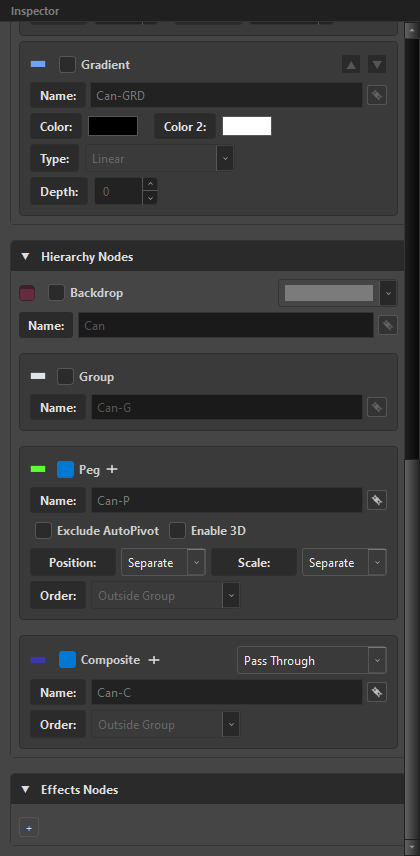
The four components
-
 Peg —
Peg — P
The transform. Named
<name>-P. Carries Position (Separate/3D Path), Scale (Separate/Locked), Enable 3D, and Exclude AutoPivot. -
 Group —
 G
The scope. Named
<name>-G. A group is what makes a slot a self-contained unit — everything inside it is inside it. -
 Composite —
 C
The aggregation point. Named
<name>-C. Carries the composite mode and its Order. -
Backdrop —
BD
The Node View rectangle around the branch, with a colour and a note. Purely organisational — and the thing the layout engine sizes from the inside out.
Peg Order: Parent or Child
Peg and Group can swap places, and the Order combo on the Peg block decides which:
| Order | Result | Read as |
|---|---|---|
Outside Group |
Peg → Group → content | the peg moves the whole group |
Inside Group |
Group → Peg → content | the peg moves the content, inside the group's scope |
The Details column always reflects the choice you made: (Peg > Group > Read) or (Group > Peg > Read).
Composite Order and mode
The Composite block carries the same Order choice (Inside Group / Outside Group) and, more importantly, the composite mode:
| Mode | What it does |
|---|---|
As Bitmap |
flattens its inputs into a bitmap |
As Seamless Bitmap |
the same, without the seam artefacts on adjacent art |
As Vector |
keeps vector data through the composite |
Pass Through |
does not composite — passes its inputs upward |
These write keywords, not indices
The mapping between these labels and Harmony's stored values was measured in a Harmony 24 install, not guessed — three of the four entries in the map every tool was carrying were wrong (As Vector was writing the value for Seamless; Pass Through was writing the value for Vector). If a composite ever behaves like a different mode than its label, that is the class of bug to suspect, and OSA is on the measured side of it.
Two hierarchies, in parallel
The Node View carries two graphs at once, and OSA lays them out as two:
| Hierarchy | Colour | Connects | Rule |
|---|---|---|---|
| Input / Transform | 🟢 green | Peg → children | indentation means child |
| Output / Composite | 🔵 blue | Comp → siblings below | a comp aggregates the siblings below it |
They are separate because one peg can drive several distinct compositions. Transformation and composition are not the same tree, and drawing them as one is what makes hand-built graphs unreadable.
What a composite aggregates
Whether a comp collects children or siblings depends on one thing only: whether the slot has a green container to create a scope.
| The slot has | The comp aggregates |
|---|---|
C alone |
siblings below |
D-C |
siblings below |
BD-C, BD-D-C |
siblings below — a backdrop is visual |
P-C, G-C, P-D-C, BD-P-C |
children |
Only P and G are green containers. A backdrop draws a box; it owns no connection, so it never changes who aggregates what.
When a comp meets another comp at the same level, the current block is flushed — that is the block boundary.
Full rules, with the flow and the port order: Aggregation & The Sibling Aggregator.
The Wide Bus
OSA does not drop nodes wherever Harmony feels like. It treats the Node View as a logical matrix and pre-allocates space, so the graph flows left to right instead of piling up.
| Row | Occupant |
|---|---|
| Top row | master pegs / master groups / master drawings — whichever the super node has |
| Middle row | the factory floor: drawings, groups and mini-nodes, side by side |
| Bottom | composites, offset below whatever they aggregate |
| FX strip | five reserved slots (OP, CUT, BLD, GLW, BLR) under composites that are direct children of the backdrop or of the super node itself |
Because the FX strip is reserved rather than allocated on demand, adding an effect later does not shove the rest of the graph sideways.
The expandable backdrop
A backdrop is born with a minimum width of three node columns, and it deliberately keeps tactical empty space between the last content node and the final composite. That gap is not sloppiness — it is where you drag a new node in later without breaking the layout.
Matryoshka: nested backdrops
Backdrops can contain backdrops, and the sizing is computed bottom-up, from the inside out.
| Constant | Value | Is |
|---|---|---|
COL_WIDTH |
200 px | one column |
ROW_HEIGHT |
80 px | one row |
PAD_SIDE |
50 px | backdrop side padding, each side |
PAD_TOP |
100 px | room for the backdrop header |
PAD_BOTTOM |
150 px | room for the comp and the FX area |
GAP |
20 px | space between siblings |
Width
- a leaf (drawing or peg with no backdrop) is
1column; - a nested backdrop is
sum(children) + gaps + 2 × PAD_SIDE, rounded up to whole columns; - a parent backdrop uses the same formula over its children's computed widths.
Height
- a leaf is
2rows (peg row + drawing row); - a backdrop is
PAD_TOP + max(children heights) + PAD_BOTTOM.
The fundamental rule: a nested backdrop never inherits its width from the parent. Each one measures its own content, and the parent adapts to its children. That is what makes a deeply nested scene come out with everything visible rather than clipped or overlapping.
Root-BD  (computed last)
├── Nested-BD-A  (4 cols)
│   ├── D1  (1 col)
│   └── D2  (1 col)          → inner 2 cols + gap → 4 with padding
├── Nested-BD-B  (6 cols)
│   ├── Sub-BD  (3 cols)
│   │   └── D3  (1 col)
│   └── D4  (1 col)          → inner 5 cols + gap → 6 with padding
└── Sibling-Peg (2 cols)

Root inner = 4 + 6 + 2 + gaps = 14 cols
Root total = max(14, MIN_WIDTH) + padding
Backdrop colour and note

The Backdrop block carries a name, a colour swatch and a note. The colour is the one thing in the Node View that survives a re-open and a hand-off — use it for the reading you want a stranger to get in three seconds.