Importing Files
Everything enters through the Browser on the left: double-click a file, or drag a selection (or a whole folder) into the Staging column.
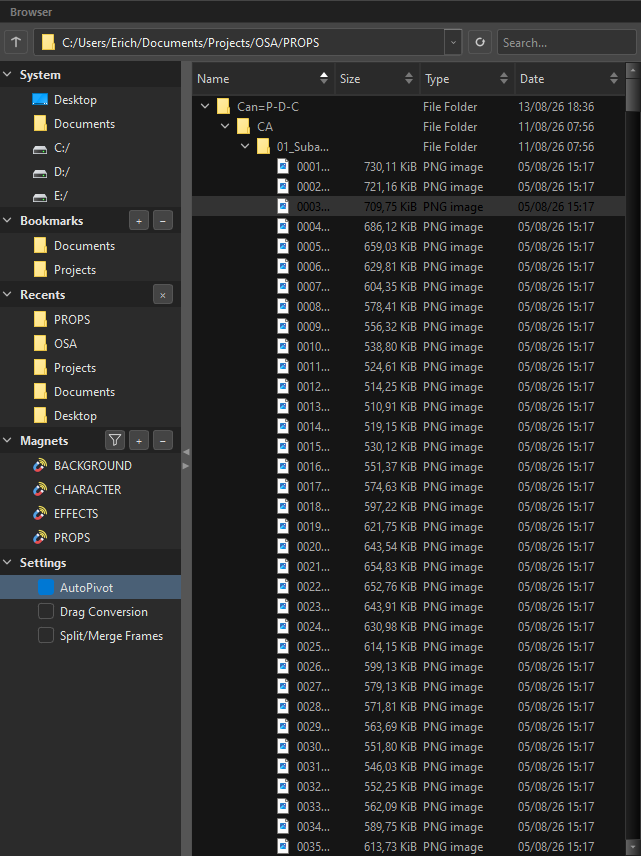
Nothing is written to Harmony at this point. Importing here means "put a plan for this file into the tree".
What OSA reads
| Format | Kind | Becomes |
|---|---|---|
.psd / .psb |
Photoshop | A whole branch — see PSD |
.png |
Raster | A drawing, or one exposure of a sequence |
.jpg / .jpeg |
Raster | Same |
.tif / .tiff |
Raster | Same |
.tga |
Raster | Same |
.tvg |
Toon Boom vector | Copied in as it is — it already is a Harmony drawing |
.svg |
Vector | Parsed and written as native Harmony strokes |
.tpl |
Harmony template | Staged as one opaque block |
.anm |
Octo Transform Sync animation | Animation applied to the slot's peg |
.pvt |
Blender bake (pivots) | Pivot data for the slot |
Why .tvg and .svg are not the same road
A .tvg is a Harmony drawing, so it is copied byte for byte — no conversion, no alpha, no alignment; there is nothing to convert. An .svg is a source: Harmony has no scripted SVG import at all, so OSA parses the paths itself and writes real pencil strokes into the drawing. The SVG file never enters the scene.
Folders
Dragging a folder brings the folder and its contents, and the folder structure becomes the tree structure. Subfolders become branches; the files inside them become the leaves.
Three things happen on the way in:
- Names are parsed for tags — a folder called
arm=P-Garrives with its peg and group already ticked. - Magnets catch what they recognise — a folder called
PROPSis routed under yourPROPSbranch instead of landing at the root. - Numbered files are grouped into sequences — see below.
Inside a PSD, a magnet is a folder with the exact name and no tags
A Photoshop folder is a magnet signal only when its name is the magnet — PROPS, or one of its aliases — and it carries no tags. The folder itself is not created; what is inside it is routed under PROPS.
Anything that carries = and tags is a node of its own, never a signal: PROPS/Prop-1=P-D gives you a Prop-1 drawing with its peg, sitting inside PROPS. And a name that merely resembles a magnet does not count — Prop-1 is a prop, not the PROPS folder.
Image sequences
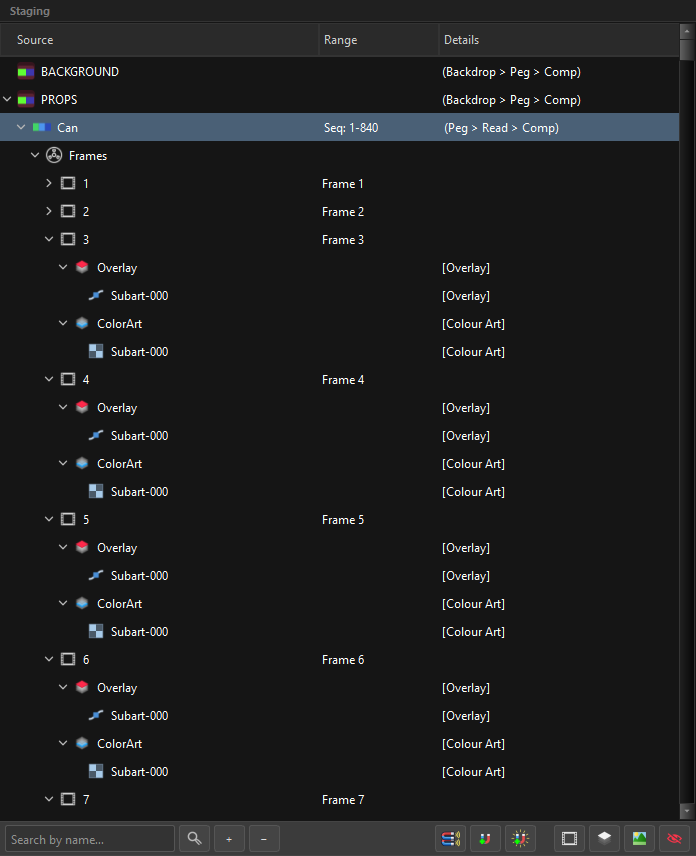
A folder of numbered files is not twelve drawings — it is one drawing with twelve exposures.
OSA detects the numbering, builds a single slot, and puts each file into the intrinsic Frames folder as its own frame. The Range column then reports what it found:
| Range column says | Meaning |
|---|---|
Seq: 1-840 |
a continuous run of exposures |
Seq: 1-12, 20-24 |
two runs, with a gap — the ranges are merged and reported honestly |
Frame 3 |
a single exposure at frame 3 |
Hold: 5-8 |
one drawing held for four frames |
Empty |
a drawing slot with no artwork yet |
Template |
a .tpl |
The number is the anchor. The position in the list does not decide which frame a file becomes — the number in its name does. A file that is missing from the run leaves a hole, and the hole is reported rather than closed silently.
See Frames & Exposure.
PSD
OSA parses the PSD itself and rasterises each layer — Harmony's own layered-PSD import is never called. That is what makes the rest of this possible:
- Groups become branches. The Photoshop hierarchy is the staging hierarchy.
- Layer names are read as tags.
head=P-G-Cin Photoshop is a peg, a group and a composite in Harmony. - Art-layer tags route the artwork.
line=LAandflats=CAbecome two art layers of one drawing. - Adjustment layers become effect nodes. Brightness/Contrast, Hue/Saturation, Levels and more — see PSD Adjustment Layers.
- Layer masks become mattes, wired into the effect's matte port.
- Clipped layers attach to the layer below, the way they read in Photoshop.
What the import fills in for you
Photoshop has no concept of a Harmony cel, so a few things are created on the way in. They exist so that tagging can stay as light as possible inside Photoshop:
| In the PSD | In the tree |
|---|---|
A layer with artwork tagged =D |
a drawing, plus a Frames folder with frame 1, the artwork inside it |
A group tagged =P-G-C |
a slot with the peg, group and composite ticked |
Layers tagged =LA, =CA, =OL |
one drawing with three of its art layers filled |
| A layer with no art-layer tag | artwork on Line Art |
The =D-on-a-layer case is worth knowing, because it is the one that saves you the most typing. Here is a real tagged file:
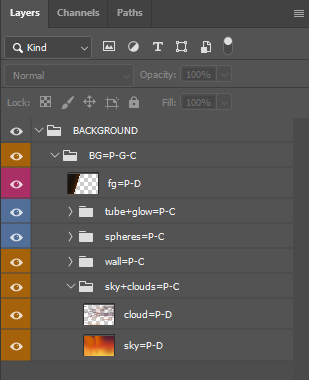
Read the bottom group. sky+clouds=P-C is a folder: it becomes a slot with a peg and a composite, and it aggregates what is inside it. Inside it are two layers, cloud=P-D and sky=P-D — each one its own drawing with its own peg, and sky sits below cloud exactly as it does in Photoshop, because tree order is composite order.
Now suppose the sky's artwork belonged to the folder itself. Tagging the folder =D would put the container's drawing above its children — the sky would end up in front of the cloud. And making a sky=D container just to hold one layer is ceremony for nothing. So you tag the layer: sky=D, a sibling of cloud, exactly where the composite order needs it — and OSA supplies the frame, because in Harmony a drawing without an exposed cel does not exist.
Notice that every layer holding artwork carries the D itself — fg=P-D, cloud=P-D, sky=P-D — while the folders that only aggregate do not: wall=P-C, tube+glow=P-C. D is what turns a row into a drawing, and OSA writes the frame for you once the D is there; it does not add the D because it found pixels. If you leave it off, the layer still comes in — as artwork belonging to whatever container it lands in, an art layer or a track — but not as a drawing of its own.
See Concepts → What OSA creates implicitly.
.psb (Photoshop Large Document) goes through the same parser — it is the same format with 64-bit size fields, which is what your 30 000-pixel backgrounds are saved as.
An empty layer is not a mistake
OSA never prunes a layer for having an empty bounding box. A blank layer is a legitimate placeholder in a lot of pipelines, and deleting the artist's placeholder is worse than staging an empty drawing.
Harmony templates (.tpl)
A template arrives as a single row marked 
Template, carrying the frame range it declares (Seq: 1-840).
It is one of the two rows that are not ordinary slots (the other is the intrinsic Frames folder). Harmony hands a template over as a block: OSA places it, parents it and routes it, but does not open it up, because its insides belong to Harmony.
Drop it anywhere a drawing could go — including inside a magnet branch, where it is auto-parented like everything else.
Alpha and alignment
Two per-drawing choices live in the Inspector's Import Options, and both have honest defaults taken from what Harmony itself would choose for that format:
Alpha — how the file's transparency is interpreted:
| Mode | Use when |
|---|---|
Premultiplied with Black |
the default for PNG, JPG, TIFF, TGA |
Straight |
the default for PSD |
Premultiplied with White |
artwork composited over white |
Clamp Colour to Alpha |
fringing you want clipped rather than corrected |
Alignment — how the image is fitted to the scene:
| Label | What it does |
|---|---|
Actual Size |
one image pixel = one scene unit at the project's own resolution |
Project Resolution |
same rule, scaled to the project resolution |
Fit |
fits the whole image inside the camera |
Vertical Fit |
fits by height, leaving the horizontal free to centre |
Horizontal Fit |
fits by width |
Pan |
aligns to the first page — for artwork that scrolls |
These are keywords, not indices
OSA writes Harmony's alignment keyword, never the enum's integer. The numbering is documented nowhere, and guessing an index is precisely the class of bug that leaves a scene looking right and reading wrong.
Import mode
Every drawing container answers one question: does the artwork go inside the drawing, or is the drawing just a pot pointing at a file outside?
| Mode | Meaning |
|---|---|
| Art Layers (default) | The artwork lands in the drawing's art layers. You choose which one. |
| Original Bitmap | The drawing references the file as it is. There are no art layers at all. |
Vector or bitmap is decided by the file, not by you
In Art Layers mode there is no vector-or-bitmap switch to set, because it was never a real choice: the file already is one or the other, and OSA writes each art layer in the mode its artwork needs.
| The file | The art layer is written as |
|---|---|
.tvg |
vector — copied in as the drawing it already is |
.svg |
vector — re-drawn as native Harmony strokes |
.png, .tga, .tiff, .jpeg, a PSD layer |
bitmap |
And the kind is read from the signature bytes, not from the extension — a .png that is really a TIFF is treated as what it is, not as what it is called.
One art layer is one kind
Harmony's art layer is vector or bitmap, never both, so stacking an .svg and a .png on the same Colour Art is a conflict. The top track sets the layer's kind and the tracks of the other kind are skipped — named one by one in the import report, and left in your staging tree so nothing you authored is lost. Full rule, with the icons that tell the two apart: Drawings, Art Layers & Subart.
See Original Bitmap for what that mode gives up and what it buys.
Transform Sync files
.anm and .pvt carry animation and pivots from Octo Transform Sync, not artwork. They are browsable and stageable, but they never become a drawing — they attach to the peg the slot builds.