Original Bitmap
Every drawing container answers one question in Import Options → Mode:
| Mode | The drawing is… |
|---|---|
| Art Layers (default) | a native Harmony drawing; the artwork lives in its art layers |
| Original Bitmap | a pot pointing at the image file as it is |
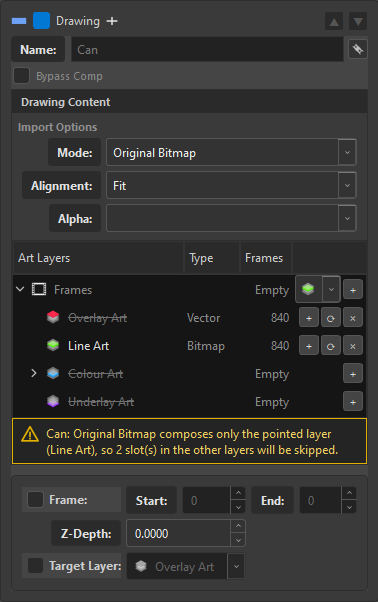
The screenshot is the whole story in one frame: Line Art stays white because it is the pointed layer — the recipe — while the other three come out greyed and struck through, set aside rather than deleted. And the yellow banner does the counting for you: "Original Bitmap composes only the pointed layer (Line Art), so 2 slot(s) in the other layers will be skipped."
What Original Bitmap gives up
There are no art layers at all. Not "they are empty" — the concept does not apply. A drawing in this mode has no Underlay, Colour Art, Line Art or Overlay, because its content is the external bitmap, not a Toon Boom drawing.
Two things follow, and OSA is careful about both:
- The tree stops naming a layer. Where an Art Layers drawing shows
[Colour Art]in Details, an Original Bitmap one shows[Original Bitmap]. Naming a layer there would be a lie. - Vector cannot land here. An
.svgor.tvgtrack routed at an Original Bitmap drawing is not written — and it is not deleted from your tree either. See What survives.
What it buys
- The pixels are the file's. No conversion pass, no re-encode, no interpretation of alpha into a Toon Boom drawing. What you delivered is what the scene references.
- Big artwork stays cheap. A 30 000-pixel background does not have to become a native drawing to be usable.
- Crop is the pivot normalisation. In this mode the crop is how AutoPivot normalises the exposure, in one pass.
So how does stacking work with no layers?
This is where the two modes are exact mirrors of each other, and it is worth reading twice.
The frame is where the artwork lives. With no art layers, the exposure is the only place left that certainly exists — so the frame container becomes the artwork's home. That home is OSA's own bookkeeping; what Harmony ends up with is an exposed cel, which is what an exposure is regardless.
You can still stack several images on one exposure in Original Bitmap. You still build that stack under an art layer in the staging tree — because the staging tree is a plan, and the plan needs somewhere to hold an ordered pile. That art layer is called the recipe: it is not a destination, it is the list of what to combine.
When Assemble runs:
| Mode | Where the stack flattens |
|---|---|
| Art Layers | the tracks flatten into the art layer; the container's own artwork flattens on top of the layer it points at; the frame becomes pure timing |
| Original Bitmap | the recipe flattens into the frame — because there is no art layer to live in |
And the container decides which layer is the recipe. The drawing container sits above the frames, and its Target Layer names the art layer whose stack gets composited. That is the one instruction that survives a mode where art layers otherwise mean nothing: it says "this pile, in this order, is what the bitmap will be".
So the pointer runs the other way from the native mode, and that symmetry is the whole design:
| Mode | Target Layer means | Direction |
|---|---|---|
| Art Layers | where the frame's own artwork goes | frame → layer |
| Original Bitmap | what the frame is made of | layer → frame |
Same field, same pointer, opposite direction — which is why the frame had to be able to hold artwork in the first place. Had it been a pure timing node, there would be nothing for the recipe to flatten into.
Why the recipe layer disappears afterwards
Once the composite has happened, the recipe has done its whole job. OSA removes the emptied layer from the tree, because in Original Bitmap it only ever existed to point at a composition — keeping it would show you a layer the scene cannot have.
Why the tree changes after Assemble
Harmony has no such thing as a subart layer: there are four art layers and the frame, and no more. The instant Assemble finishes, a staging tree full of stacks is describing a world the scene cannot store.
So OSA rewrites the stack of every drawing that landed into the shape the scene really has. The flattened row keeps SCENE_ART and its provenance — where the artwork came from, its type, its thumbnail — and the slot goes on accepting new tracks. The next composition composes on top.
The flat is not the end, it is the base. There is no hidden recipe kept behind your back: the art that is in the scene is the source.
What survives a flatten
OSA flattens what landed, not what was asked for. The writer records every source that actually reached the element; anything that did not arrive is not in that set and survives in your tree:
- a vector track routed at an Original Bitmap drawing,
- the loser of a mixed stack,
- a file that went missing between staging and Assemble.
Removing those would be deleting authorship for something the scene never received. It also means a cancel halfway through flattens only the drawings whose sources made it — which is the only honest rule available, because Assemble is not a transaction.
If any blocking failure is reported against a drawing's node path, that drawing is not flattened at all: a refused write means the landed set may be incomplete in exactly the way that misleads.
Switching is instant, and it converts nothing
The mode is a reading, not a surgery. Flip it and the answer applies immediately: no dialog, no conversion, and nothing in your tree moves. Frames stay frames, art layers stay art layers, every sequence stays exactly where you authored it.
What changes is which rows count. In Original Bitmap the layers that are not the recipe show up struck through — set aside, not gone — and the pointed layer stays live, because its stack is what the flatten will compose. Switch back to Art Layers and everything returns whole, exactly as it was.
The actual flattening happens at Assemble, at the press of the button — never at the switch. An empty Frames container is fine: the compose reads the pointed layer's stack either way.
Choosing the mode
| Use Art Layers when | Use Original Bitmap when |
|---|---|
| The artwork will be painted, cut or re-drawn in Harmony | The artwork is final and only needs to be placed |
| You want line and colour on separate layers | The image is a flat plate |
The source is vector (.svg, .tvg) |
The source is a large raster you don't want converted |
| You want per-layer control at composite time | You want the file's own pixels, untouched |