Licensing & Activation
Octo Scene Assembler is a one-time perpetual licence, activated per machine.
The trial
The first launch starts a free trial — the full tool, no restrictions. A bar at the bottom of the window shows how long is left, and it carries its own Activate and Dismiss buttons so it never becomes a dialog in your way.
The bar changes tone as the trial runs down, and turns urgent in the last three days.
Activating
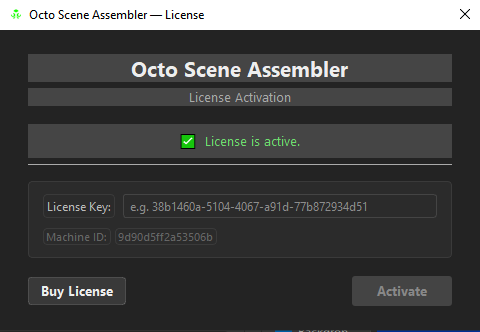
- Open the activation dialog from Preferences → License → Change License Key…, or from the trial bar's Activate button.
- Paste your License Key (
38b1460a-5104-4067-a91d-77b872934d51). - Press Activate.
The dialog also shows your Machine ID — the string support will ask for — and a Buy License link.
Where the licence lives
In the same folder OSA keeps its own data:
%APPDATA%/Toon Boom Animation/Toon Boom Harmony Premium/
    octo_scene_assembler/license.json
Beside it live your saved sessions, which is deliberate: one folder to back up, one folder to clear.
Deactivating and moving machines
Deactivate (Preferences → License) frees the activation slot before you move to another computer. Do it before formatting or replacing a machine.
If the licence server cannot be reached, deactivating still clears your local licence — so you are never locked out of your own machine by a network problem.
Machine binding
A licence is bound to a machine fingerprint — a hash of the machine and the user. Copying license.json to another machine does not carry the licence: the copy will not validate, and OSA logs the mismatch rather than failing mysteriously.
Activate properly on each machine instead. Each machine consumes one activation slot.
Offline use
Once activated, OSA works offline. It re-checks with the server periodically; if you are offline at re-check time, it keeps working until the next time you are online.
Studio / multi-seat
Use one key per artist, or a single key with an activation limit covering several machines. Keys can be disabled or given an expiry from the store — useful for temporary or comped seats.
About
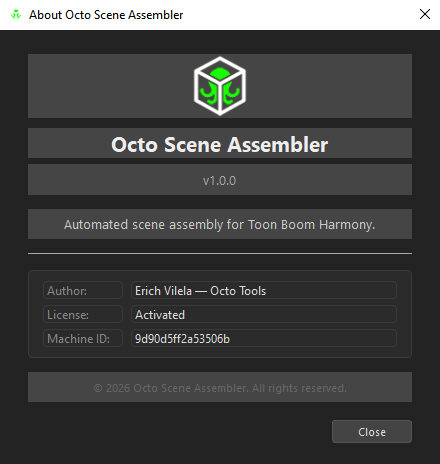
? → About shows the version, the licence state and the Machine ID. When you file a bug, this window has the three things the report needs.