Keyboard Shortcuts
Every binding below is rebindable in Preferences → Keyboard Shortcuts, except the read-only block at the end.
The context menus read their hints from this same table, so a rebound key updates the menu on the next open — no menu label can go stale.
Create structure
These create a new container node in the tree.
| Action | Shortcut |
|---|---|
| New Super Node | Ctrl+N |
| New Peg (container) | Ctrl+P |
| New Group (container) | Ctrl+G |
| New Composite (container) | Ctrl+H |
| New Drawing (container) | Ctrl+R |
| New Backdrop | Alt+B |
| New Frames… | Ctrl+F |
Attach structure
These add a component to what is already selected, instead of creating a new row. Same letters as above, plus Shift.
| Action | Shortcut |
|---|---|
| Attach Peg to selection | Ctrl+Shift+P |
| Attach Group to selection | Ctrl+Shift+G |
| Attach Composite to selection | Ctrl+Shift+H |
| Attach Drawing to selection | Ctrl+Shift+R |
| Attach Backdrop to selection | Shift+Alt+B |
| Attach all structure to selection | Ctrl+Shift+N |
Create vs Attach is the whole pattern
Ctrl makes a new thing. Ctrl+Shift adds that thing to the selection. It holds for structure and for effects, which is why there are twice as many bindings as there are verbs.
Effects
Ten effects on ten keys — 1 through 0 — with the same create/attach pair.
| Effect | Add | Attach to selection |
|---|---|---|
| Transparency | Ctrl+1 | Ctrl+Shift+1 |
| Cutter | Ctrl+2 | Ctrl+Shift+2 |
| Blending | Ctrl+3 | Ctrl+Shift+3 |
| Glow | Ctrl+4 | Ctrl+Shift+4 |
| Blur | Ctrl+5 | Ctrl+Shift+5 |
| Brightness/Contrast | Ctrl+6 | Ctrl+Shift+6 |
| Hue/Saturation | Ctrl+7 | Ctrl+Shift+7 |
| Levels | Ctrl+8 | Ctrl+Shift+8 |
| Tone | Ctrl+9 | Ctrl+Shift+9 |
| Highlight | Ctrl+0 | Ctrl+Shift+0 |
| All effects | Ctrl+' | Ctrl+Shift+' |
The apostrophe is not an accident: the ten individual effects fill 1…0, so the key next to them is the one that means all of them.
Generators
Generators are a different family on purpose — they are holders, not effects — so they get Alt + a letter, the way Backdrop does.
| Action | Shortcut |
|---|---|
| Add Colour Card | Alt+C |
| Add Gradient | Alt+G |
Structure operations
| Action | Shortcut |
|---|---|
| Merge Selected | Ctrl+J |
| Merge Down | Ctrl+E |
| Split — As Hierarchical | Ctrl+B |
| Split — As Siblings | Ctrl+Shift+B |
Magnets
| Action | Shortcut |
|---|---|
| Generate Magnet Tree | Ctrl+M |
| Generate Magnet Tree + Assemble | Ctrl+Shift+M |
Read-only
These are not OSA's to rebind.
| Action | Shortcut | Source |
|---|---|---|
| New Peg (container) | Ctrl+P | Harmony |
| New Group (container) | Ctrl+G | Harmony |
| New Composite (container) | Ctrl+H | Harmony |
| New Drawing (container) | Ctrl+R | OSA |
| Undo / Redo | Ctrl+Z / Ctrl+Y | Standard |
| Copy / Cut / Paste | Ctrl+C / Ctrl+X / Ctrl+V | Standard |
| Duplicate | Ctrl+D | Standard |
| Remove from staging | Del | Standard |
| Rename | F2 | Standard |
The Harmony-sourced ones follow your Toon Boom config. Change them in Harmony's Edit → Keyboard Shortcuts and OSA picks them up, so a peg is created with whatever key your hands already know.
The universal conventions are deliberately not in the rebinding table: a table that lists Ctrl+C invites somebody to rebind Copy.
Rebinding
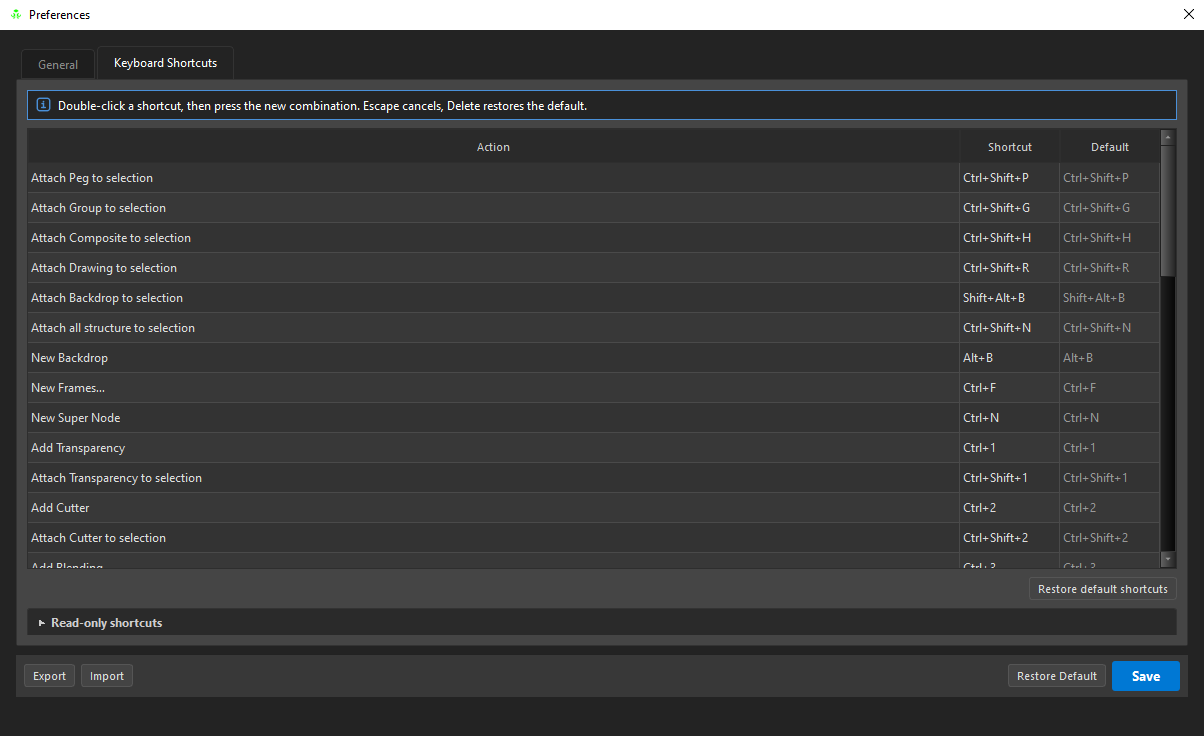
Double-click a shortcut, then press the new combination.
| Key | Does |
|---|---|
| the new combination | binds it |
| Esc | cancels |
| Del | restores that action's default |
The Default column always shows the factory binding beside your own, and Restore default shortcuts resets everything.
A combination already in use is refused rather than taken — an overlap is a shortcut that fires the wrong action, silently.