Generators
A generator makes pixels out of nothing: a flat colour, or a gradient. OSA has two — Colour Card and Gradient — and they live in their own block, not in the effect chain.
Why they are not effects
An effect transforms what flows through it, so it belongs in a chain, in series, with an order.
A generator produces. It has no input. Putting it in the chain would be claiming it sits between two things it does not sit between.
So generators are holders: they are born as their own node, a sibling beside the drawing, plugged into a port of the composite. Their position among the parent's children is their order in the comp — there is no separate ordering control, because the tree already has one.
That is also why the tags are structural: bg=CC says "this node is a Colour Card", exactly the way =P says "this node is a peg".
| Tag | Generator |
|---|---|
CC |
Colour Card |
GRD |
Gradient |
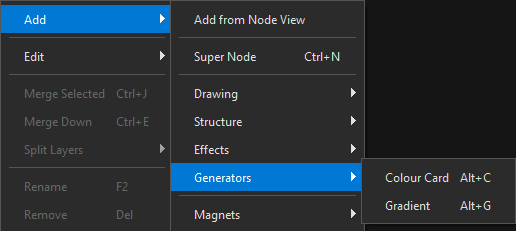
Add them from the tree with right-click → Add → Generators:
Colour Card
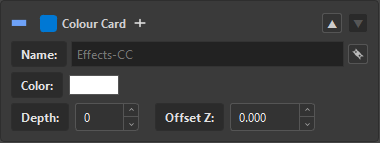
| Control | Does |
|---|---|
| Color | the flat colour, with alpha |
| Depth | the composite depth attribute |
| Offset Z | the Z offset attribute |
A Colour Card sits at the back by attribute, not by position
Harmony puts a Colour Card behind everything using its DEPTH and OFFSET_Z attributes — not the node's z coordinate in the Node View. OSA writes those attributes; moving the node around the graph will not change what it sits behind. That is measured behaviour, and it is the reason both fields are exposed here instead of being hidden defaults.
Gradient
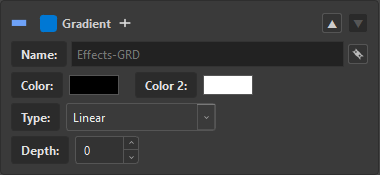
| Control | Does |
|---|---|
| Color / Color 2 | the two stops |
| Type | Linear or Radial |
| Depth | the composite depth attribute |
Two colours, and only two. Harmony's gradient plugin exposes Color0 and Color1 — there is no third stop to write. A Photoshop gradient with three or more stops still comes across, but OSA warns rather than silently dropping the ones it cannot represent.
Naming
Like every other component, a generator's name is derived from the slot plus its suffix — Effects-CC, Effects-GRD — and the  link button keeps it following the slot's name. Unlink
  to hold a name of your own.
Coming from Photoshop
| Photoshop layer | Becomes |
|---|---|
Solid Color (SoCo) |
a Colour Card, with the colour read from the file |
Gradient Fill (GdFl) |
a Gradient, with both stops read — and a warning if the original had more |
See PSD Adjustment Layers for the full crossing table.