Concepts & Vocabulary
Nine words carry the whole tool. Learn them once and the rest of this manual reads itself.
Slot
A slot is one row of the Staging tree — and it is not one node.
This is the single idea OSA is built on. A row called sky is not "a drawing". It is a slot that may create, all at once:
- a Backdrop around everything below it,
- a Peg, a Group, a Composite,
- a Drawing (a Read node) with its artwork,
- and a chain of effects hanging off the composite.
The Details column spells out what that row will produce, in the order it will be wired:
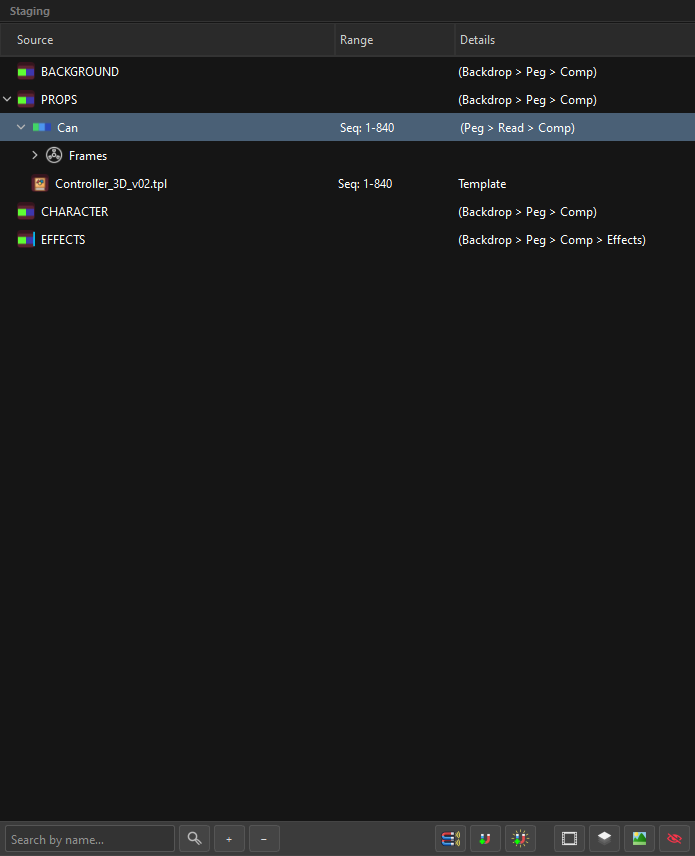
(Backdrop > Peg > Comp) means: this row makes three nodes. (Peg > Read > Comp) means peg, drawing, composite. One row, three nodes, one name — Can-P, Can, Can-C.
Why this matters
Every other tool makes you create the peg, then the group, then the composite, then connect them. Here you tick a checkbox and the wiring is implied. That is also why the tree stays readable at 300 items: you are looking at slots, not at the node graph.
Every row is the same row
There is one kind of row in this tree, and one Inspector behind it. A folder, a PSD layer, an image sequence, a frame, an art layer — they are all the same object. What differs is only which boxes are ticked.
Two things follow from that, and they are the answer to most "wait, why can it do that?" questions:
Anything can become anything. A row that arrived as a flat PNG can grow a peg, a composite and four art layers without being converted into a different kind of thing — there is nothing to convert. Drag a drawing onto another drawing and the target simply becomes a container; it did not change species.
Which is exactly why a container can still hold artwork of its own. OSA is a hybrid: it stages Photoshop layers, loose image sequences, Harmony templates and SVG in one tree, and you re-arrange them by dragging. If becoming a parent meant giving up your artwork, then every drag would be a chance to silently destroy a drawing. So the rule is the opposite one:
A container keeps the artwork it already had. Nothing is dropped because the hierarchy changed.
The artwork is never in the way — it is a peer of the children, and the merge policy decides how they combine at Assemble time (a frame's own artwork merges over the art layers it points at; sibling images on the same art layer flatten into one, in order).
But only two kinds of row hold artwork
This is the nuance, and it is not a detail — it is where Harmony's own model stops being negotiable:
| Row | Holds artwork? |
|---|---|
| Frame | ✅ yes |
| Art layer (and subart) | ✅ yes |
| Drawing node | ❌ no |
| Structure — Peg, Group, Composite, Backdrop | ❌ no |
| Generators — Colour Card, Gradient | ❌ no |
| Effects | ❌ no |
A drawing node is a Read: it points at an element, and the pixels live in the element's cels. In Harmony there is no drawing without a frame — the artwork lives in an exposed cel, always.
So the honest reading of "a container keeps its artwork" is:
A container keeps its artwork when it is a kind of row that can hold artwork. When it is not, the artwork moves down to a row that can — it is never dropped.
The Frames folder that appears by itself
Turn a row that carries artwork into a drawing node and, on the face of it, the artwork has nowhere to live. What actually happens: OSA creates the intrinsic Frames folder and a frame 1 inside it, and the artwork migrates down into that frame.
Ticking Drawing in the Inspector does exactly this, and unticking it removes the folder again.
It migrates — it is not copied
The artwork moves; it does not exist in both places. Two copies would make the collector read the same source twice — once for the container, once for the frame — and the writer's de-duplication would record the second read as a loss. One home, always.
What OSA creates implicitly
There is a short list of things you never ask for and always get, and every one of them exists so that tagging can stay simple where you actually do it — in Photoshop, or in a folder name.
| You do | OSA also creates | Because |
|---|---|---|
Tick Drawing, or tag a layer =D, on something carrying artwork |
the Frames folder and frame 1, with the artwork inside | in Harmony there is no drawing without an exposed cel |
| Drop a numbered sequence | one drawing with one frame per file | twelve numbered files are twelve exposures, not twelve drawings |
| Put artwork on an art layer that already has some | a subart layer, and the first image is promoted into one beside it | two images on one layer is a stack, and a stack needs rows |
| Import artwork with no art-layer tag | it lands on Line Art | one default, agreed on by the collector, the Inspector and the stack logic |
Why =D on a Photoshop layer matters
The case it exists for: inside sky=P the artist wants cloud=P-D and the sky's own artwork, with the sky below the cloud in the composite.
Putting =D on the sky=P folder would put the container's drawing above its children. Creating a sky=D container just to hold a single 001 layer is ceremony for nothing. So the artist tags the layer: sky=D, a sibling of cloud, sitting exactly where the composite order needs it.
There is no rig decision hidden in that: =D is explicit — you already said "this is a drawing" — and the frame is the mechanical consequence, in the same family as the one legitimate implicit ("it has frames inside, therefore it is a drawing").
Tag in Photoshop, not in the tree
This is the whole point of the implicit rules: your Photoshop file can carry the structure with the fewest possible keystrokes — a =P here, a =D there — and OSA fills in the plumbing that Harmony's model requires anyway.
The rows that are not slots
Two, and only two: the intrinsic Frames folder, and a Template (.tpl), which Harmony hands over as one opaque block.
Staging
Staging is the plan; the Node View is the result.
Nothing in the middle column exists in Harmony yet. You can drag, rename, split, merge, delete and re-order at no cost, because the scene has not been touched. The plan becomes real only when you press Assemble.
Your work is saved anyway — see Sessions & Crash Recovery. Harmony crashing does not cost you the tree.
Tag
A tag is a naming convention that OSA reads as an instruction.
sky=P-C means "the drawing sky, with a peg and a composite". You can write that tag in three places and it means the same thing in all three: a Photoshop layer name, a Windows folder name, or a row you renamed inside OSA.
| You write | You get |
|---|---|
head=P |
drawing head + peg head-P |
head=P-G-C |
drawing + peg + group + composite |
BG=BD |
a backdrop named BG |
shadow=OP |
drawing + a Transparency effect |
hand=CA |
the artwork goes into Colour Art, not Line Art |
Full grammar in Tags.
Magnet
A magnet is a named destination that catches folders by name.
Define a magnet called PROPS, and any folder named PROPS (or one of its aliases) that you drag in gets routed under your PROPS branch automatically, however deep it was buried. Magnets are what let you drag a whole delivery folder in and have it land sorted.
See Magnets.
Structure nodes
The four hierarchy components a slot can create, in wiring order:
| Component | Harmony node | Tag |
|---|---|---|
| Backdrop | a backdrop rectangle in the Node View | BD |
| Group | Group | G |
| Peg | Peg | P |
| Composite | Composite | C |
| Drawing | Read (the drawing node) | D |
Peg and Group can swap places — Peg Order decides whether the peg is the group's parent or its child. See Structure Nodes & The Wide Bus.
Art layer
A Harmony drawing has four internal layers: Underlay, Colour Art, Line Art, Overlay. OSA treats each one as a place artwork can be aimed at, and each can hold more than one image — those extra images are subart layers.
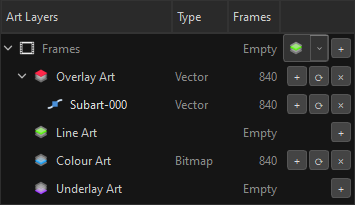
See Drawings, Art Layers & Subart.
Frame
A drawing's exposures live in an intrinsic Frames folder inside the slot. A frame carries a number, a duration (a hold) and, optionally, its own art layers.
The Range column reports what it finds: Seq: 1-840, Frame 3, Hold: 5-8, or Empty.
See Frames & Exposure.
Super node
A slot that swallows its children.
When one slot carries several components and children, OSA can build it as a single self-contained unit in the Node View — one peg, one group, one composite, with the content inside. It is how you keep a 200-node scene navigable, and how renaming one row renames every node that belongs to it.
See Super Nodes.
The Wide Bus
The layout rule that keeps the Node View readable.
OSA does not drop nodes wherever Harmony puts them. It treats the Node View as a grid: masters on the top row, content side by side on the middle row, composites below what they aggregate, and a reserved strip under each composite for its five effect slots.
Backdrops nest like matryoshka dolls — each one is measured from the inside out, so a backdrop that contains two backdrops is exactly as wide as it needs to be, plus padding.
See Structure Nodes & The Wide Bus.
Assemble
The one destructive verb. It walks the staging tree, creates the nodes, connects the ports, writes the attributes, imports the artwork and lays the graph out.
Everything before it is reversible for free. Assemble is not — see Assembling for what it does and what it reports back.