History & Undo
The History panel sits under the Navigator, in the bottom half of the left column. It is the whole undo model, visible.
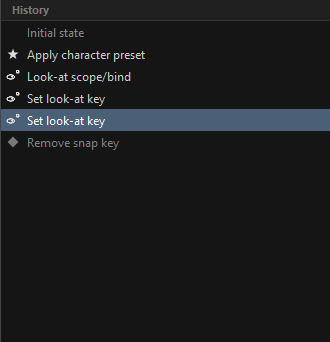
One timeline, not two stacks
ORC uses Photoshop's model: a single linear list with a pointer, not an undo stack plus a redo stack.
- Everything above the highlighted row is the past.
- Everything below it is the forward branch — what redo would replay. It is drawn greyed, with its icons at half opacity.
- Doing something new truncates the forward branch from wherever you are.
A thin Initial state row is pinned at the top and is always reachable.
Using it
| Action | How |
|---|---|
| Undo | Ctrl+Z |
| Redo | Ctrl+Shift+Z or Ctrl+Y |
| Jump anywhere | Click the row |
Clicking a row travels straight there — twenty steps back is one click, not twenty undos. A jump moves the pointer and never pushes a new entry, so you can wander freely and come back.
The feedback bar names what happened: "Undo: add driver", "Jump: capture frame". When there is nowhere to go it says "Nothing to undo" in red.
Inside a text field, Ctrl+Z undoes your typing instead — the field's own undo takes priority.
Reading a row
Each entry carries a glyph for the kind of thing you did, not for the verb. Adding a driver shows the driver bolt, not a generic plus — you scan a history looking for what you touched.
| Glyph | Kind |
|---|---|
| A driver | |
| A constraint | |
| A visibility group | |
| A look-at | |
| A control | |
| A preset | |
| A frame or snap | |
| A target | |
| A side or mirror change | |
| A paste | |
| A channel | |
| A drawing | |
| A rename | |
| An add or a remove |
What counts as one step
More than you would expect, on purpose.
One gesture is one entry. Deleting a pose layer internally fires a structural change, a knob detach and an axis clear — three requests that would each become an entry, so one Ctrl+Z would only half-undo it. ORC keeps the first and drops the rest.
A slider drag is one entry. Dragging a driver or look-at slider fires around sixty changes a second. ORC snapshots the value before the drag and then waits for you to stop.
A bulk write is one entry. A grid fill, a preset apply and a grid paste each take a single snapshot for the whole run, however many snaps they touch.
What it does not do
Undo never writes to your Harmony scene. Compose is the only thing in ORC that does. Undoing a pose layer deletion restores it inside ORC; your scene was never touched in the first place.
Depth and memory
Two limits, and the second is the one that actually bites on a heavy rig:
| Limit | Default | Where |
|---|---|---|
| Number of entries | 50 | History depth in Preferences, 10–250 |
| Memory | A fixed ceiling | Not configurable |
Every entry is a full snapshot of the rig, so a deeper history costs real memory. When the total gets too large the oldest entries are dropped regardless of your depth setting, and it is noted in the log.
Lowering the depth trims immediately.
One document, one history
The Widget Editor opened from inside ORC shares this history. Undo a widget move and the History panel steps back; undo a pose layer deletion and the editor's canvas reloads.
The standalone Widget Editor is a separate document and keeps its own undo, with its own depth setting.
History is not saved
The panel is a session tool. Closing ORC ends it — it is not written to disk and it does not come back with a restored session.
What does survive is the work: your rig data is autosaved, and reopening offers to restore it. See Re-editing a Composed MC.
During a long apply
While a preset or a session is being applied, ORC blocks input and shows a wait cursor. That is deliberate: clicking a navigator halfway through an apply would show you half-restored state and read as a bug. Events are dropped rather than queued, so it costs nothing.
If the apply needs to ask you something, the block lifts for the question and resumes after.
Related
- Keying & Auto-Capture
- Preferences — History depth
- Pose Presets — which apply as a single undoable step