Character & Config Presets
This is the family that answers "I built this once — how do I use it on the other forty characters?"
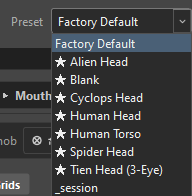
The Preset combo in the top bar holds configuration presets: the shape of a rig without any of one character's specific work.
What a config preset is
It stores the skeleton and the look:
| It keeps | It deliberately drops |
|---|---|
| Every layer's grid, slider positions, custom spacing | Authored poses |
| Which knob each layer keys across | Imported MC wiring and its frames |
| Magnet keywords | Look-at target pegs and deform lists |
| Every widget's position, scale, colour and label | Per-snap driver and look-at values |
| The controls and their names | |
| Visibility groups | |
| Look-at settings and overlay sliders | |
| Your workspace state — active face, pinned navigators |
That split is the whole design: a config preset is a template, not a copy of a character.
Magnets are what make it portable
A preset carries the words — brow, eyebrow, sobrancelha — not the node paths. On the next character those words find that character's nodes.
The shipped presets
Marked with a ★, and offered before your own:
| Preset | Shape |
|---|---|
| Human Head | Eyebrows, Eyelids and Mouth Corners as L/R pairs, with a 13-position knob |
| Cyclops Head | One eyebrow, an eyelid slider, a mouth pair |
| Spider Head | Eight eyebrow pairs, eight eyelid pairs, a mouth pair — with mandible magnets |
| Tien Head (3-Eye) | One pair plus one solo |
| Alien Head | |
| Human Torso | The control is named Torso |
| Blank | No layers, no controls — just the four default visibility groups |
Each face-based preset arrives as a full Control: a Front and a Back face at 5 × 3, its pose layers as free layers inside it, and a real knob wired to both faces.
Factory Default is always first in the list and is the shape a fresh rig starts with.
Using them
| Button | What it does |
|---|---|
⎘ |
Overwrite the selected preset with your current layout. Click twice to confirm. Right-click to reset a shipped preset back to factory. |
💾 |
Save the current setup as a new named preset. |
✕ |
Delete. Factory Default and shipped presets refuse. |
⬇️ |
Export to a file. |
⬆️ |
Import one. A name clash asks before overwriting. |
Selecting a preset applies it immediately.
Applying onto a rig that already has work
This is where the feature earns itself, and it is worth understanding.
A preset's layers do not automatically correspond to yours. If ORC matched by name, a rig where you renamed "Eyebrows" to "Brows" would get a second set of layers instead of an update.
So it matches by structure, role and order — never by display name — and then decides one of three things per control:
| Situation | What happens |
|---|---|
| No matching control | Created. The preset's control is added as its own. |
| An empty control matches | Filled, silently. It keeps its identity, takes the preset's name, and the preset's faces land on its existing faces. |
| An authored control matches | You are asked. |
"Authored" means real work
A control counts as authored when any of its layers has actual poses — native frames, imported frames, or a driver with values — or it carries look-at keys.
Targets alone do not count. Sides alone do not count. Those are configuration, not work, and being asked about them every time would train you to click through the prompt.
The control is the unit: if one of its layers is authored, the whole control is. ORC will never fill one face of a turnaround and leave the other.
The prompt
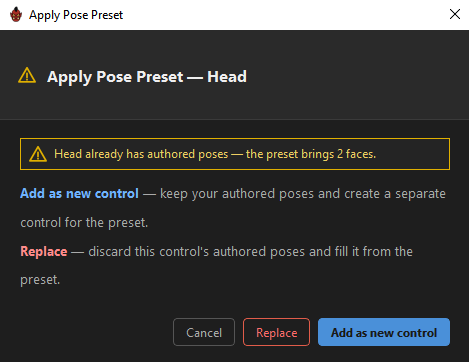
Apply Pose Preset — Head
Head already has authored poses — the preset brings 2 face(s) + 3 layer(s).
Two choices:
Add as new control (default) |
Keep your authored poses and create a separate control for the preset. |
Replace |
Discard this control's authored poses and fill it from the preset. |
Both are two-click: the first click arms and spells out the consequence —
Replace discards "Head"'s authored poses — click Replace again to confirm.
Cancel stops the entire apply. Nothing is written, and the feedback bar says "Preset apply cancelled."
On a rig with several authored controls you are asked once per control.
Add as new control is genuinely safe
It re-keys everything the incoming control references, so it can never collide with — and therefore never move — your existing work.
Presets and pose presets
Two families, two jobs:
Config preset (Preset combo) |
Pose preset (📋 Poses) |
|
|---|---|---|
| Carries | The rig template and its look | Any of nine sections, including the poses |
| Built for | Starting the next character | Moving a whole configuration, or part of one |
| Poses | Never | If you tick Poses |
They share the same reconcile machinery, so a pose preset's Structure section behaves exactly like a config preset when it lands.
A working method for a cast
- Rig the first character properly.
💾save it as a config preset — the shape, the widget layout, the groups, the magnets.- On the next character, pick that preset. The layers, grids, knob and layout arrive; the magnets pull in that character's nodes.
- Author the poses.
- When you improve the template,
⎘overwrite the preset and pick it up on the next one.
For a character that is genuinely the same rig with different art, importing the composed MC is often faster still — and if the imported MC is not in that scene, ORC composes natively from the frames it has rather than failing.
Where they live
Config presets are .json files in ORC's defaults folder under %APPDATA%\OctoRigComposer\. Pose presets sit beside them in frame_presets, and the Pose Presets dialog prints each file's full path.
Related
- Pose Presets
- Grid Presets
- Re-editing a Composed MC
- Targets — the magnets that make a preset portable