Display Modes & Filters
The filter bar sits between the Outliner's toolbar and its tree — one compact row:
- Display mode — shows only the active mode's glyph; the names appear in the popup.
- Search — a substring match on the node name, with a ✕ to clear.
- Funnel — the Type and Role filters. Grey when idle, blue when any filter is on.
The distinction that matters:
- A display mode re-roots the tree — the same rig, organised around a different spine.
- Filters only hide rows. They never change the columns and never reorganise anything.
The two compose: a filter narrows whatever the active display mode is showing.
Display modes
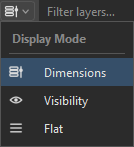
The left-most button shows only the active mode's glyph. The names appear in the popup.
The button shows the layer-stack glyph.
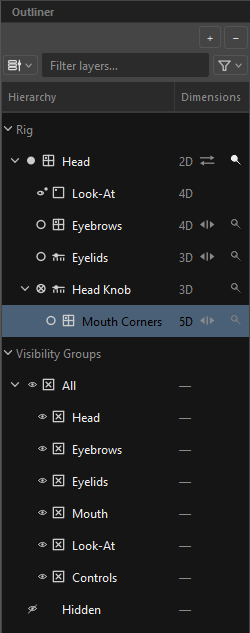
Columns: Hierarchy | Dimensions.
The canonical authoring tree. Controls sit under Rig; pose layers nest under their controls or under the knob they key across; look-ats, drivers and constraints sit where their key domain says they belong.
This is the only mode that paints the trailing glyphs — turnaround, mirror and Σ — and the dimension chips.
The button shows the eye.
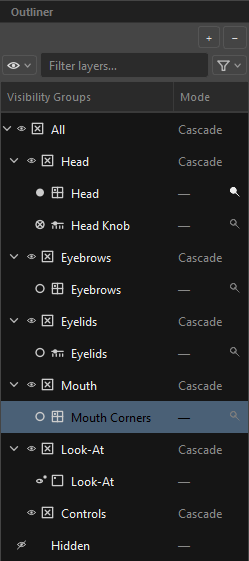
Columns: Visibility Groups | Mode.
A pure re-root onto the group hierarchy. The Rig section disappears entirely and the root groups — All, Hidden — are promoted to the top level: the tree is the group hierarchy.
Every member — controls, layers, drivers, constraints, look-ats — appears as a leaf under its group. Control hierarchy is not expressed here; a control is just another member.
The second column shows each group's cascade Mode: Cascade or Override, so a stray Override stands out immediately. Members show —.
A widget always belongs to a group. An empty, unset or stale group id resolves to All, never to nothing. If All itself is ever missing, an italic grey Unassigned bucket appears as a safety net and disappears again once nothing dangles.
The button shows three stacked lines.
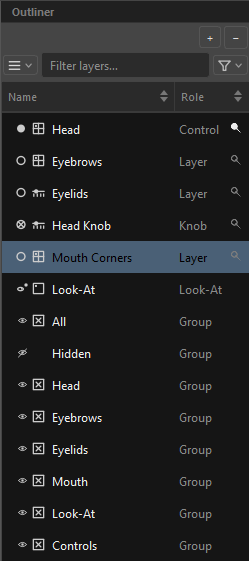
Columns: Name | Role.
Every node at one level — this is the search-and-find surface. Both section headers are hidden and the second column swaps to the node's role: Control, Layer, Knob, Look-At, Driver, Constraint, Group.
Sorting is Flat-only. Click a header to cycle: 1st click ▼ descending, 2nd ▲ ascending, 3rd back to natural order. Sort arrows are painted only in this mode. (Dimensions and Visibility are hierarchies; sorting them would destroy the very structure you read them by.)
Dragging is disabled in Flat. With no visible hierarchy, a drop would silently reparent something in a structure you cannot see.
Switching modes always preserves your selection, and remembers whether you had Rig collapsed. The active mode persists for the session.
The search box
Placeholder Filter layers…, with a small ✕ to clear. It is a case-insensitive substring match on the node's name.
The funnel
The funnel button carries its state in its colour:
| Glyph | State |
|---|---|
| Idle — nothing filtered | |
| Any filter is on. The tooltip then tells you what — "Filters — Type 2 · Role 1" |
The popup has two submenus and one action.
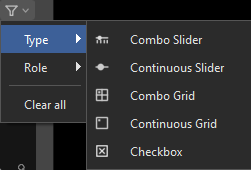
Filters by widget type — the right-hand glyph on every row.
| Item | Applies to |
|---|---|
Combo Slider |
1-D pose layers, knobs, controls |
Continuous Slider |
drivers only |
Combo Grid |
2-D pose layers, knobs, controls |
Continuous Grid |
driver pads and look-ats |
Checkbox |
drivers |
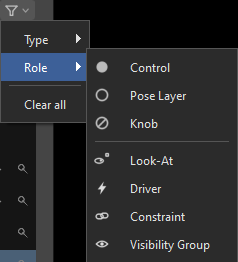
Filters by what kind of node it is — the left-hand role glyph.
Pose structure: Control, Pose Layer, Knob.
Attached nodes: Look-At, Driver, Constraint, Visibility Group.
Clear all at the bottom clears both axes at once.
How the filters behave
- The two axes and the search text are three independent constraints, ANDed together. An empty axis means "no constraint" and passes everything.
- A node with no value on an axis — a Control has no widget type — can only pass while that axis is unconstrained.
- Ancestors are kept. A row is shown if it matches or if any descendant matches; otherwise a deep match would be unreachable.
- A row that is only on the path to a match, rather than a match itself, is painted at 40 % opacity — it reads as a route, not a result.
- Absorbed Front/Back faces never appear and never contribute a match to their control.