Visibility Groups
A visibility group decides what an animator can see and reach on the canvas.
A finished head rig can carry fifty widgets. Groups are how the animator gets four checkboxes instead — Head, Eyebrows, Eyelids, Mouth — and turns on only the part they are working on.
Add one with + → Visibility Group. It is created at root level, as a sibling of Hidden. To nest one inside another, right-click the parent and use New Visibility Group Inside — that is the only way to create a nested group.
Every widget belongs to a group
Pose layers, controls, drivers, constraints, look-ats and their overlay sliders each carry a Visibility Group picker. The picker reads the same everywhere:
No Group
Hidden
──────────
<your groups>
──────────
+ New Group
| Entry | Meaning |
|---|---|
No Group |
Always visible — no group governs this widget. It is a real state, and it is the way out of a group. |
Hidden |
Off and out of the way. |
+ New Group |
An action, not a choice — it creates a group and opens its rename. |
A widget with no group answers to nothing
That includes the All checkbox. If a widget seems to ignore every toggle, check whether it is in No Group.
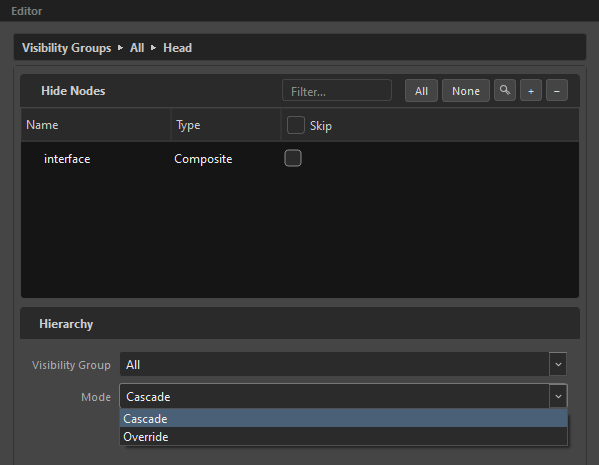
Cascade or Override
The one real decision a group makes.
| Mode | A parent that is off hides… |
|---|---|
Cascade (default) |
Its children's checkboxes only. Their widgets stay on the canvas. |
Override |
Its children's checkboxes and their widgets. |
Read it as: Cascade tidies the control panel. Override actually turns the section off.
A group's own checkbox never hides itself — you need it to switch back on.
In the Outliner's Visibility display mode the second column shows each group's mode, so a stray Override stands out at a glance.
Off means unreachable
When a group is off, its widgets are not drawn and not pickable. They are not merely faded — they are out of the controls list entirely.
What that does not do is remove the state. A hidden driver still holds its value; a hidden look-at still aims. Hiding is about the control, not the behaviour.
Hide Nodes
Beyond widgets, a group can disable Harmony nodes themselves. Add them from the Node View in the group's Hide Nodes list, and they are disabled whenever that group is switched off.
This is how a Hidden prop group takes the prop out of the render, not just its handle off the canvas.
The same trick covers interface-only drawings: rigs often carry art that exists purely for the OpenGL view — posing guides, region markers, an eye-direction cross — that must never reach the render. Park those drawings in a group's Hide Nodes and toggle them off before rendering; keep them in an always-on group during animation and they behave like part of the UI.
The Hidden group
Hidden is the one permanent group. It cannot be renamed or deleted, and selecting it shows a dry message instead of a setup page:
Anything placed in Hidden stays off and out of the way — nothing to set up here.
Hidden is how you park something without deleting it. Two places rely on it:
- A driver's influence exists only when it is not in Hidden. Hidden is the influence's off switch; there is no separate checkbox.
- Look-at overlay sliders are all created in Hidden. Drag one out to expose that field to animators.
Hidden is the only fixed group
Every other group — All included — is yours to rename, nest or delete. Delete All and the next root-level group takes over as the universe.
Nesting
Groups nest as deep as you like. In the Outliner, drag one onto another to nest it, or onto the Visibility Groups header to bring it back to the top.
A group cannot nest inside itself or its own descendant — the drop is refused with "A group can't nest inside itself."
Delete Hierarchy removes a group and its child groups. Its members are reparented, never deleted — deleting a group must never delete a driver.
Auto-prune
By default, groups with no content of their own are dropped from the composed MC — no drivers, no constraints, no hide-nodes, no widgets, and not the ancestor of a surviving group. This stops placeholder groups from shipping as dead checkboxes.
Your rig data keeps them; only the compose output is affected. Turn it off in Preferences if you want placeholders visible.
Reading them in the Outliner
Switch the Outliner to Visibility mode and the tree re-roots on the group hierarchy: the Rig section disappears, the root groups are promoted to the top, and every member appears as a leaf under its group.
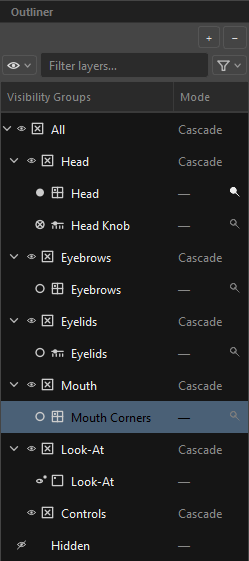
It is the fastest way to answer "what does this checkbox actually control?"
Related
- The Outliner
- Display Modes & Filters
- Widget Editor — where the checkboxes are placed
- Drivers — where Hidden is an off switch