Pose Layers
A pose layer is a grid of snaps plus a list of nodes it is allowed to move.
That is the entire definition. Eyebrows, eyelids, mouth corners, a finger curl, an ear — each is one pose layer.
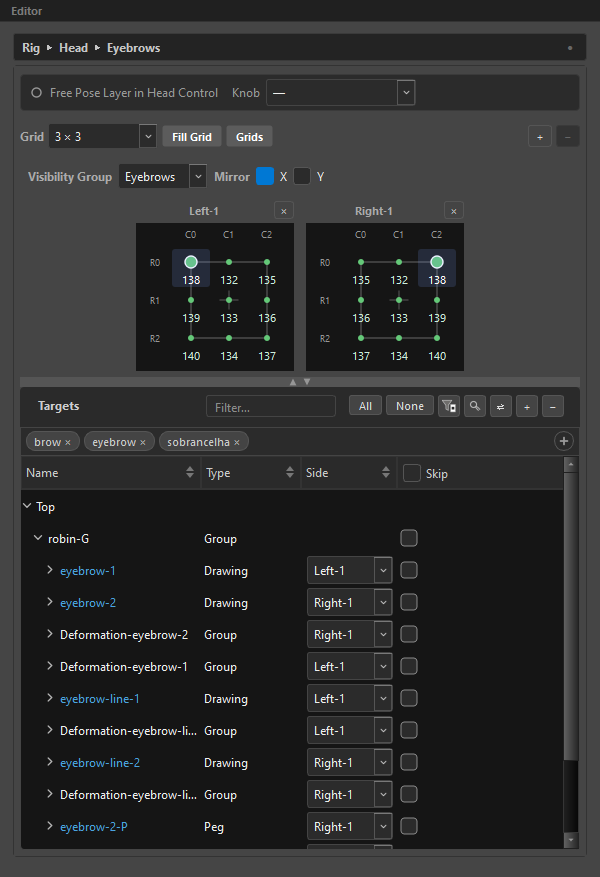
What a layer stores
Per snap, exactly one thing: a frame number.
Not a pose, not a set of deltas — the number of a frame in your Harmony timeline where the pose lives. At Compose time ORC goes and reads what the rig looks like at that frame. See Frames-first.
That is why a layer's grid shows numbers, and why an unkeyed snap shows —.
Where a layer lives
Where a layer sits in the Outliner is what it keys across. There are three possibilities:
| Placement | Keys across | Composes |
|---|---|---|
| Inside a control | That control's grid | One pose per control snap |
| Under a knob | The knob's positions and the knob's control | Once per combination |
At level 0, under Rig (global) |
Nothing above it | Head-less — one pose at every control pose |
A new layer created with the toolbar + is born global. Drag it onto a control to nest it, or right-click it and use Move to Head Control / Move to Control ▸.
Moving a layer re-keys it
Going global collapses all of its per-control poses down to one — necessarily, since it stops varying per control pose. ORC keeps the pose you are currently parked on. Going the other way is lossless.
Both are a single Ctrl+Z away.
The layer header
| Control | What it does |
|---|---|
| Status dot | Its role — filled for a face, ring for a free layer, cut ring for a knob. |
| Role text | Free layer, or the control and face it belongs to. |
Knob |
The axis this layer keys across. See Knobs. |
Fill Dimensions |
Copy this layer's frames across its knob's positions. Appears only when the layer has a knob. See Fill. |
⤓ Unroll |
Bake this layer's MC poses to the timeline. Appears on a free layer whose MC has poses. |
The grid row
| Control | What it does |
|---|---|
Grid |
The shape: 2 × 2, 3 × 2, 2 × 3, 3 × 3, 5 × 3, 7 × 3, Combo Slider, or Custom… (up to 32 × 32). Labels read columns × rows. |
Fill Grid |
Fill the grid with a frame sequence. |
Grids |
Grid presets — save or load a shape, its spacing and its frames. |
Pos |
Number of positions. Sliders only, 2–1024. |
+ / − |
Add or remove a page. See Pages, Pairs & Sides. |
Visibility Group puts this layer's widget in a group; Mirror X / Y picks which axis mirrors between the L and R grids of a pair.
Below that sit the grids themselves, and the layer's target list.
Targets
A layer's targets are the Harmony nodes it may move. Select them in the Node View and press + in the Targets toolbar.
Two layers may name the same node. ORC marks the overlap on the row and tells you whether the two writes add up (blue) or replace each other (yellow) — see Targets.
A keyed layer with no targets blocks Compose, with the reason in the button's tooltip:
The "Eyebrows" layer is keyed but has no targets. Add what it should move to its target list.
Naming and organising
| Action | How |
|---|---|
| Rename | F2, or double-click the name in the Outliner |
| Duplicate | Ctrl+D — clones structure and targets. Poses are not copied. |
| Delete | Delete, or the − button |
Deleting a layer that has keys asks once, in the feedback bar, and gives you five seconds to confirm. On a layer with nothing keyed it just goes — a confirmation that always fires is a speed bump, not a safety net.
A zero-layer rig is legal. A rig made only of drivers and constraints composes fine.
Reading a layer's row in the Outliner
The second column shows the honest sum of the layer's axes — its own grid, plus its carrying control, plus its knob:
| Chip | Means |
|---|---|
4D |
Its grid (2) inside a control (2). |
| The whole row red | A compose blocker — two extra knobs colliding on one node and channel. |
Trailing glyphs:
| Glyph | Means |
|---|---|
| The layer has L/R mirror pairs. | |
| Σ | It composes additively — its keys are deltas from a neutral, not absolutes. |
A layer with a big grid
ORC warns as the numbers climb, and never blocks:
1024 snaps — authoring this by hand is a big job, and capture/compose time grows with every keyed snap.
The maths is worth internalising: a 5 × 3 control with a 3 × 3 layer is 135 poses. Add a 13-position knob and it is 1,755. The tool will happily let you; the poses are still yours to author.
Related
- Controls — the carrying parent
- Knobs — turning a layer into an axis
- Grids & Snaps — authoring the grid itself
- Keying & Auto-Capture — putting poses in