Unroll
Unroll is the inverse of Compose. Compose bakes your authored poses into a Master Controller; Unroll takes the poses stored inside an MC and re-creates them on the Harmony timeline as keyframes.
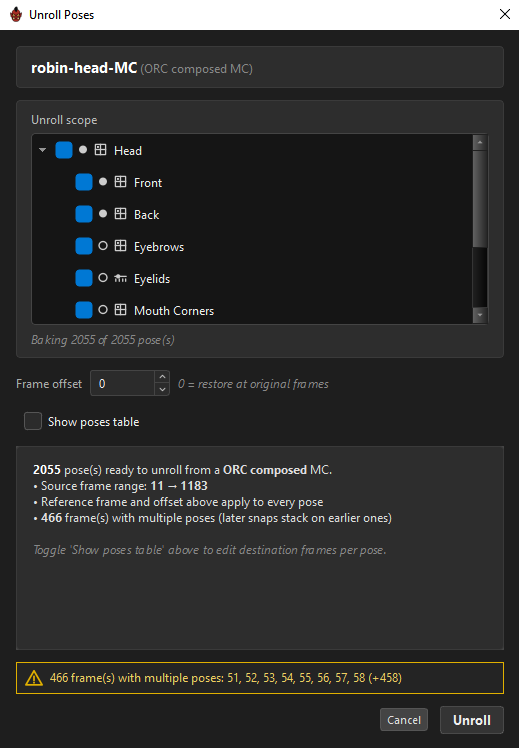
Use it to:
- recover poses you lost from the timeline — see below,
- get an inherited rig's poses back onto frames so you can edit them,
- hand an animator a keyframed version of a rig,
- merge a front and a back MC into one timeline — something Harmony's own unroll cannot do.
The composed MC is a backup of your poses
The first use is the one that saves a production day. The poses a composed MC carries are complete copies inside its state files — they do not depend on the timeline frames they came from. So if those frames get deleted, overwritten, or lost to a bad save, the MC still holds every pose, and Unroll puts them back on the timeline as keyframes. Compose bakes them in; Unroll gets them out.
What it can unroll
| MC | Shown as | Poses come from |
|---|---|---|
| An ORC-composed MC | ORC composed MC |
ORC's own pose data and manifest |
| A Toon Boom slider MC | Harmony slider MC |
The states inside its .tbState files |
| A Toon Boom grid MC | Harmony grid MC |
The states inside its .tbState files |
| A Toon Boom stack / cube MC | Harmony stack MC |
The states inside its .tbState files |
Plain Toon Boom MCs work. ORC recognises them by their own UI script and reads their poses through Toon Boom's state manager.
Where to start it
| From | Scope |
|---|---|
A control's ⤓ Unroll button |
That control — both faces |
Right-click a control → ⤓ Unroll Poses… |
That control — both faces |
A pose layer's ⤓ Unroll button |
Opens the dialog with only that layer checked |
The layer button only appears on a free layer whose MC was imported — a layer you authored from scratch has no MC to unroll.
When no MC is loaded the button is greyed, and the tooltip says why:
Locked until a Master Controller is loaded for this rig — set the MC in the source bar above.
Front + Back in one pass
With both slots set, ORC unrolls them merged, into a single timeline. The plan is titled robin-front-MC + robin-back-MC and each warning names which MC it came from.
The dialog
Unroll scope
A checkable tree of what to bake, drawn with the same glyphs as the Outliner.
| Row | Default |
|---|---|
| A control | Checked. Unchecking greys out its children. |
Front / Back |
Checked. Each side scopes independently, so you can bake front only. |
| A free pose layer | Checked. |
| A knob | Checked only if it has targets of its own. |
Globals |
Checked, when global layers exist. |
A knob with no targets is disabled, and says why:
Knob — a dimension, not a pose layer. It has no targets of its own, so there is nothing to unroll here. Checking a layer that rides this knob already unrolls every pose along the knob's dimension.
Under the tree, a live count: Baking 2055 of 2055 pose(s). At zero, the Unroll button disables.
One mechanism covers every case — bake the whole MC, one control, one layer, one global layer, or one side.
Frame offset
Frame offset is added to every source frame. 0 restores the poses at their original frames; positive shifts everything later, negative earlier.
The poses table
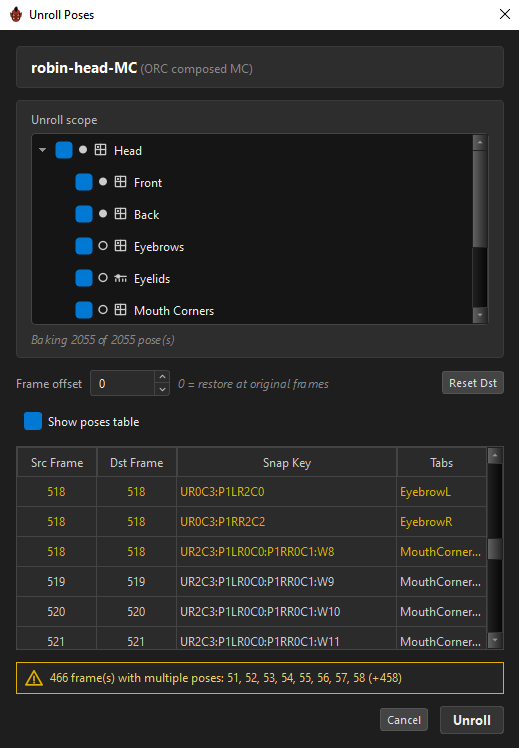
Tick Show poses table for a row per pose:
| Column | Editable |
|---|---|
Src Frame |
No — where the pose was authored |
Dst Frame |
Yes — where it will be written |
Snap Key |
No — the pose's address |
Tabs |
No — which stacks contribute |
A native MC shows Src Frame, Dst Frame and Pose Name instead.
Row text is tinted to warn you:
| Colour | Meaning |
|---|---|
| Amber | More than one pose lands on this destination frame |
| Red | The destination frame is below 1 |
Reset Dst puts every row back to Src + offset.
The table defaults to on, except for plans of 500 poses or more, where it opens off for speed. Both views are always ready, so toggling is instant.
Warnings
| Message | Meaning |
|---|---|
| 466 frame(s) with multiple poses: 51, 52, 53… (+458) | Later snaps will stack on earlier ones at those frames. |
| N frame(s) ≤ 0 — fix before applying | Blocks Unroll until fixed. |
Running it
A progress popup reports each chunk:
Frame 1200 / 2055 — controls=600 · layer writes=205488 · failed=0
| Counter | Means |
|---|---|
controls= |
Facade states applied — one per control pose |
layer writes= |
Individual attribute writes from pose-layer data. This is why the number is large. |
failed= |
Writes that found no node or column |
Cancel is armed — click once to arm for four seconds, again to abort. The friction is deliberate: aborting mid-unroll leaves your timeline partially written. It stops at a chunk boundary (fifty frames), never mid-write.
Everything runs inside one Harmony undo step, so a single Ctrl+Z takes it all back.
| Outcome | Message |
|---|---|
| Clean | Unroll done — 2055 pose(s), controls=600 · layer writes=205488 · failed=0 |
| With failures | Unroll: 2000 OK, 55 failed write(s), 2 failed frame(s) — see log |
| Cancelled | Unroll cancelled — 812 pose(s) applied |
What it writes
Unroll writes no files. Its entire output is keyframes, attribute values and drawing exposures in your scene.
For each frame it restores the control's own pose from its state file — head pegs, jaw deformers, lip-sync drawings, exactly as authored — and then writes the pose layers' deform offsets, handle lengths, peg transforms and drawing exposures directly onto their nodes.
A native MC has no such data, so it simply applies the named state at each destination frame.
Unroll and Compose together
They are two directions of one loop:
authored poses ──Compose──▶ a Master Controller ──Unroll──▶ timeline keyframes
That round trip is what lets you take an MC someone else built — even a plain Toon Boom one — unroll it to frames, import it into ORC, re-author what you need, and compose it back out.
Related
- Compose
- Re-editing a Composed MC
- Controls
- Widget Editor — restyling a native MC without converting it