Fill Grid & Fill Dimensions
Two dialogs, two different jobs:
| Fills | Use it when | |
|---|---|---|
| Fill Grid | Snaps of one grid (or every grid of the layer) with a frame sequence | You animated the poses as a run of consecutive frames |
| Fill Dimensions | A layer's frames across every position of its knob | You have authored one knob position and want the rest roughed in |
There is also autofill by dragging directly on the grid, which needs no dialog at all.
Fill Grid
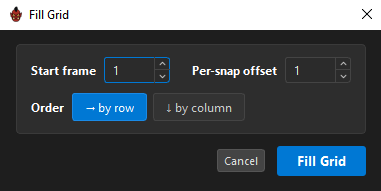
Reached from the layer toolbar's Fill Grid button or a grid's right-click menu.
The sequence
| Field | Range | Default |
|---|---|---|
Start frame |
0 – 99999 | The frame in the currently selected snap, or 1 |
Per-snap offset |
−9999 – 9999 | 1 |
Order |
→ by row / ↓ by column |
→ by row |
The order decides the direction the count walks: by row fills left to right then down; by column fills top to bottom then across.
A negative per-snap offset counts down — the return half of a turnaround.
It fills the grid you opened it from — which fills the layer, because every page and side shares one frame per snap. One sweep reaches all of them.
The whole fill is one undo step.
The common case
You animated a turnaround as frames 100, 101, 102… across the row. Start frame 100, per-snap offset 1, order by row. Done.
Fill Dimensions
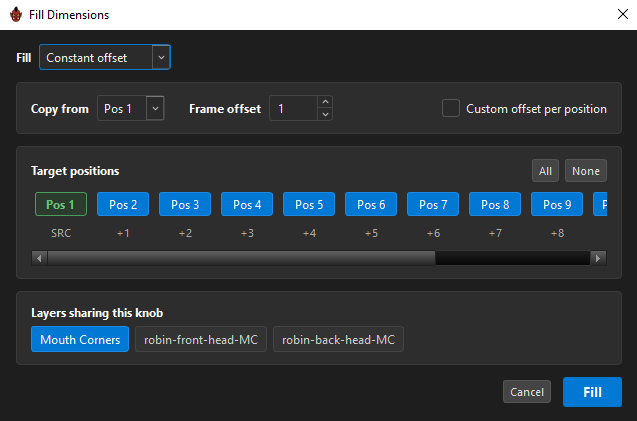
Appears in a layer's header only when that layer has a knob. It copies the layer's authored frames from one knob position onto the others.
This is the fastest way to rough in a knob axis: author the mouth grid at one phoneme, then fill it across all thirteen with an offset, and refine from there.
Modes
| Mode | What it does |
|---|---|
Constant offset |
Copies the source position's frames to each target, shifted by a frame offset |
Interpolate corners |
Blends between positions you have already authored |
Constant offset is the workhorse. Pick a Copy from position, a Frame offset, and the positions to write.
Tick Custom offset per position to give each target its own offset rather than a uniform step.
Interpolate corners needs the corners to already be authored: bilinear for a 2-D knob, linear for a 1-D one. If they are not, it says so rather than guessing:
Fill Dimensions: corners not authored — nothing to interpolate
Target positions
Every position of the knob appears as a chip labelled Pos 1, Pos 2… The source is marked SRC and each other shows the offset it would receive (+1, +2, …).
All and None select and clear them in one click — or Ctrl+A and Ctrl+Shift+A, the same pair the pose-preset dialog uses.
Layers sharing this knob
The bottom row lists every layer that keys across the same knob, so you can fill several at once.
Only layers on the same knob are eligible. One on a different knob appears greyed with the reason:
This layer keys across a different knob — …
Refusals
| Message | Meaning |
|---|---|
| "Fill Dimensions needs a knob with 2+ positions." | A one-position axis has nothing to fill across. |
| "Fill Dimensions needs a knob with 2+ positions on this layer." | This layer's knob has only one position, so there is nothing to fill across. |
Results
| Reports | |
|---|---|
| Constant offset | "Smart paste: wrote 84 snap(s)" or "Smart paste: nothing to copy" |
| Interpolate | "Fill Dimensions: wrote 84 snap(s)" |
Each is a single undo step.
Which one to reach for
| Situation | Use |
|---|---|
| A run of consecutive frames across one grid | Drag a fill grip on the grid |
| The same, but you want exact control | Fill Grid |
| One knob position authored, twelve to go | Fill Dimensions, constant offset |
| Corners authored, middles missing | Fill Dimensions, interpolate |
Related
- Grids & Snaps — filling by dragging
- Knobs
- Keying & Auto-Capture
- Grid Presets — reusing a whole shape and its frames