Compose
Compose turns everything you authored — pose layers and their keys, controls, knobs, drivers, constraints, visibility groups, look-ats — into a real Master Controller node in your Harmony scene, plus the files that node needs.
It is the only thing in ORC that writes to your scene.
The MC name
Type a name in MC Name. You do not need the suffix:
| You press | ORC does |
|---|---|
| Enter, or click away | Appends -MC if it is not already there. Head → Head-MC. |
| Enter again | Clicks Compose. |
The check is case-insensitive, so a name you typed as head-mc is left exactly as you typed it.
There is no other validation — no character stripping, no uniqueness check. Harmony decides the final node name, so a colliding name can come back changed, and ORC reports the name it actually got.
Why Compose is disabled
The tooltip is always the reason, and always something you can act on:
| Tooltip | Fix |
|---|---|
| Enter a name for the Master Controller first. | Type a name. |
| The "Eyebrows" pose layer has no keys yet. Stamp a snap with F6 or delete the empty layer. | Key it, or delete it. |
| 3 layers are keyed but have no targets (…). Add what each one should move to its target list. | Give them targets. A widget that moves nothing is not shippable. |
| Nothing to compose yet. Add poses, drivers, constraints, or look-ats — or set both Front and Back MC to bake a merged runtime. | There is nothing in the rig. |
Compose is enabled when the name is filled, no layer is half-finished, and at least one of:
- at least one pose key anywhere,
- both a Front and a Back MC are set (you are merging them),
- zero pose layers but at least one driver, constraint or enabled look-at — a rig that is only automation composes fine.
Layers that never need keys — a control's faces, a knob, an imported grid — are exempt.
Two things that stop it
Blockers — refused outright
| Conflict | Why it cannot work |
|---|---|
| Knob conflict | Two or more extra knobs writing the same node and channel. The runtime captures one pristine base per node and attribute, so those writes cannot sum — the last one would silently win. |
| Drawing conflict | One READ node swapped by two or more sibling layers. A drawing swap is discrete, so it cannot blend, and nothing ranks siblings. |
You get a red line naming the conflict, and Compose does not start. The offending Outliner row is lit red too.
A drawing swap shared down a hierarchy is fine — the deeper layer winning is intentional.
Warnings — confirm and continue
If anything is merely suspicious, the button becomes CONFIRM? for five seconds with the list beside it. Let it run out and it goes back to Compose.
No pose data loadedNo Front or Back face: import an MC or author one— only when there is neither. Front-only is normal.Driver 'Blink' (Eyelids) has no keyed valuesConstraint 'Arm Follow' has no target nodesConstraint 'Arm Follow' has no channels selected
Compose Settings
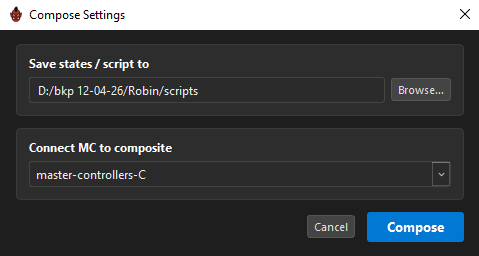
| Setting | What it decides |
|---|---|
Save states / script to |
Where the .tbState files, the runtime script and ORC's data files are written. Defaults to scripts/<group>/<MC name> in your scene, and the last folder is always the MC's own: the state files are named after the tab, so two MCs sharing a folder would overwrite each other. |
Connect MC to composite |
Which Composite the new MC is linked into. ORC pre-selects its own best guess; the full list of composites in the scene is always available. |
How the guess is made
The pick is derived from the rig itself, not from list order.
First ORC finds the rig's main group: every target-list node votes for all of its ancestor groups, and the deepest group holding a majority of the targets wins. Depth is what keeps a deformation group from claiming the vote — it only ever contains its own handful of members, so the majority always lands on the character group outside it.
Inside that group, the first match wins:
- A composite an existing MC already feeds — most MC links first. If one is inside the main group, it wins outright.
- A composite whose name follows master-controller conventions —
master-controller,masters,controllers,ctrl,-MC… - The group's main composite — the one feeding its Multi-Port-Out.
- No composite inside the group at all → the one the group node itself feeds on the outside.
Nothing matched → the scene's first composite. Whatever it picks, it is only a pre-selection — the combo always lists every composite in the scene.
Keep the same output folder between composes
The incremental cache lives there. Reusing the folder is what makes a re-compose fast.
If no composite is chosen, the MC is created in Top and left unlinked. Otherwise it is created in that composite's parent group and placed just above it in the Node View so you can find it.
What happens
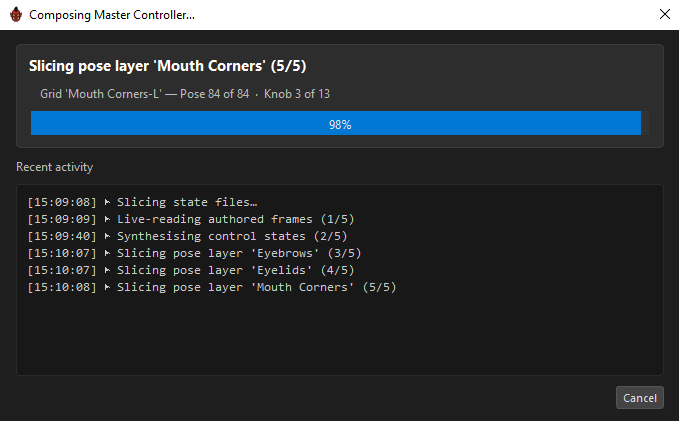
Four phases, all reported live:
| Phase | What it produces |
|---|---|
Slicing state files… |
The .tbState pose stacks, one per layer/side/page, plus the manifest. The detail line names exactly where it is: "Layer 'Eyebrows-L' — Pose 3 of 25 · Knob 2 of 13". |
Constraint pre-wiring… |
Records each constraint's original columns so its toggle can restore them. |
Generating MC script… |
The runtime script the MC will execute. |
Assembling MC node in Harmony… |
The node itself, its attributes, its UI script and data, and ORC's own blobs. |
The Recent activity log below keeps a timestamped record, including any warnings.
One Ctrl+Z undoes a Compose
The whole assembly runs inside a single Harmony undo step named ORC Compose.
The slicing phase does write columns — that is how it reads your poses — but those writes are transient, discarded, and your pose is restored afterwards whether Compose succeeds, fails or is cancelled.
Cancelling
Cancel is a two-click confirm: the first click arms it for four seconds (CONFIRM? (4s)), the second cancels. The window's ✕ behaves the same way — a running Compose never just closes. Enter never triggers Cancel, so a reflexive keypress cannot abort a half-built MC.
The cancel is cooperative: it stops at the next safe boundary, never mid-call, so you will see "Will stop after the current Harmony call returns…".
What a cancel leaves behind:
- Cancelling during slicing: the
.tbStatefiles already written stay, and the cache is saved so the work counts toward the next run. No MC node is created. - Cancelling after assembly has started: the node exists. There is no transaction over the whole compose — Ctrl+Z on the
ORC Composestep is the way back. - Either way, your pose is restored.
How it ends
| Result | What it means |
|---|---|
| Compose complete — Top/robin-head-MC | 12 state stack(s), 2 constraint(s) | Done. The Node View pans to the new node and selects it. |
| Compose finished with 3 warning(s) — see the log | The MC exists and works, but a non-fatal step had a problem. Read the log. |
| Compose failed — no state files produced | Nothing was sliceable. |
| Compose failed — script generation error | |
| Compose failed — MC assembly error: … |
What lands on disk
In the output folder you chose:
| File | What it is |
|---|---|
<Stack>.tbState, or <Stack>/0.tbState, 1.tbState… |
The pose stacks. A layer with a knob gets a folder, one file per knob position — Toon Boom's own native layout. |
<folder>_compose_state.json |
The runtime manifest. |
<name>_orc.js |
The generated runtime script. |
orc_pose_data.json |
Your whole rig configuration — the source for re-editing and for the standalone Widget Editor. |
orc_session_state.json |
The authoring UI state, so reopening restores your workspace. |
.orc_cache/snaps.json |
The incremental-compose cache. Not part of the rig; safe to delete. |
Stack names are derived from your layer names — Eyebrows and Eyebrow both become Eyebrow, sides append L/R, back stacks append Back, pages append their number.
What lands on the node
Besides the runtime script and its data, ORC writes three of its own blobs onto the MC node: your pose data, your session state and the manifest. They are embedded inline only when each is small enough; anything larger stays on disk, because embedding megabytes of text into a Harmony attribute crashes its script engine on read.
A small pointer attribute records the output folder's scene-relative path, which is how re-edit and unroll find the rest.
Keep the output folder with the scene
The MC reads its state files from disk at runtime. Move the scene without them and the rig has no poses to load. The path is stored scene-relative so moving the pair together is safe.
Re-composing
Composing again over the same rig is normal and expected — it is how you iterate.
Because ORC stores frame references rather than baked poses, you can go back to frame 861, fix the eyebrow, and re-compose: the change is picked up. Nothing needed re-keying.
The incremental cache means a re-compose only re-slices what actually changed, which is why keeping the same output folder matters.
Related
- Keying & Auto-Capture — what Compose reads
- Re-editing a Composed MC — getting back in
- Unroll — going the other way
- Troubleshooting