Grid Presets
A grid preset saves one pose layer's grid — its shape, its spacing and its frames. It is the smallest of the preset families, and the one you reach for most often.
Open it with the Grids button in a layer's grid row.
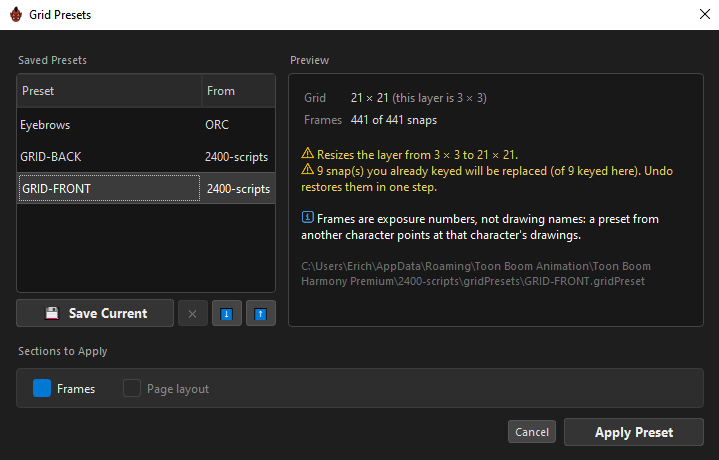
It reads Harmony's presets too
The library is hybrid: ORC's own presets and Harmony's, side by side.
| Root | Formats | Access |
|---|---|---|
| ORC | .orcGrid |
Read and write |
| Harmony | .gridPreset, .cubePreset |
Read only |
Every one of Harmony's script folders is scanned, not just the newest. The From column names which root a preset came from, because names deliberately collide across roots — the root is part of the identity, and merging them would hide one.
__LastPreset__ is scratch
Harmony's wizard rewrites that file on every run, so ORC sorts it last and marks it: "Harmony overwrites this file on every wizard run."
ORC never writes into Harmony's folder.
What ORC fixes on the way in
Reading a Harmony preset is not a straight copy — three things are translated:
- Rows are flipped. Harmony's row 0 is the bottom row; ORC's
R0is the top. The flip is derived from the file's own data, never assumed. - Positions are rescaled to ORC's own −1…+1 range, with the original extent kept so an export can restore it.
- Placeholder labels are discarded. Harmony's wizard fills every snap with
L{row}-C{col}; ORC neither carries them nor reads indices from them.
A frame value of -1 means unset. Grids must be separable — one x per column, one y per row — and an off-lattice snap is refused by name:
snap R2C3 is off-lattice — ORC grids are separable (one x per column, one y per row).
Nothing partial is ever imported. A refusal writes nothing.
The preview
Selecting a preset shows exactly what applying it would do, before it does anything.
| Row | Tells you |
|---|---|
Grid |
The preset's shape, and yours if they differ |
Frames |
How many snaps carry frames, and how many of yours stay as they are |
Knob |
How many knob positions it holds, and how many can be imported |
Pages |
How many pages it describes |
Then the warnings, most consequential first:
| Warning | Meaning |
|---|---|
| ⚠ Resizes the layer from 3 × 3 to 7 × 3. | The only one that loses work — snaps that fall outside survive in undo only. |
| ⚠ 9 snap(s) you already keyed will be replaced (of 9 keyed here). Undo restores them in one step. | |
| ⚠ Knob reaches 1 of 18 positions — 17 will not be imported (ORC never resizes a shared knob). | A knob is a separate layer shared by other layers; importing a preset never reshapes it behind their backs. |
And always, one note worth internalising:
ℹ Frames are exposure numbers, not drawing names: a preset from another character points at that character's drawings.
The full file path is printed at the bottom.
Sections to Apply
| Section | Default | What it does |
|---|---|---|
Frames |
On, when the preset has any | Off imports the shape and spacing only — the same grid, ready for you to key yourself. |
Page layout |
Off | Adds pages the layer does not have and sets its mirror axes. Never removes a page. |
Both are re-evaluated on every selection, and Page layout is only enabled when it would actually change something.
Applying
Apply Preset applies the ticked sections in one undo step.
If it would overwrite keys you already authored, the first click arms instead of applying — the button becomes Replace 9 key(s)? and gives you five seconds:
Click again within 5s to overwrite. Undo restores them in one step.
Two behaviours worth knowing:
- Frames are never blanked. Snaps the preset says nothing about keep what you authored. An import adds and overwrites; it does not clear.
- Nothing to do is reported, not performed. "Grid already matches — nothing to apply." — the history does not collect no-ops.
Saving your own
💾 Save Current writes the current layer's grid — shape, spacing and frames — as an .orcGrid, always in ORC's own folder. It suggests the layer's name.
| Button | Notes |
|---|---|
✕ |
Enabled only for ORC's own presets, and confirms first — deleting a file is the one thing undo cannot reach. |
⬇️ |
Export to a file. |
⬆️ |
Import a file into the library. A Harmony preset is converted on the way in, so the library holds one format. |
Copy Grid instead
For a one-off, skip the library entirely: right-click a grid → Copy Grid, then Paste Grid on another layer.
It is the same payload and the same code, so a copied grid and a saved preset behave identically. The clipboard survives switching layers and survives the source layer being deleted.
See Grids & Snaps.
Related
- Grids & Snaps
- Knobs — why a shared knob is never resized for you
- Pose Presets — the whole rig, not one grid