Pages, Pairs & Sides
A character has two eyebrows. They are usually mirrored, sometimes not, and they need to be posed together most of the time and separately the rest of it.
Pages, pairs and sides are how one pose layer handles that.
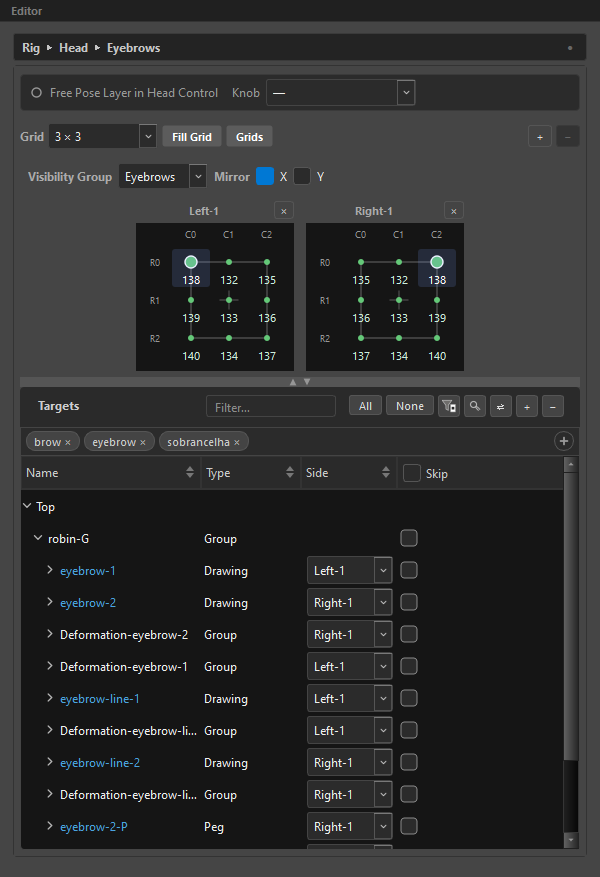
Page
A page is a numbered variant of a layer's grid. A layer starts with one page and you add more with + in the grid row.
A page holds either:
- a pair — two grids, headed
Left-1andRight-1, or - a solo — one grid, headed
Solo-1.
The small strip of numbered buttons under the grid row switches between pages. It is hidden when there is only one.
Page numbers are stable ids
Delete page 2 and the survivors stay 1 and 3. The gap is correct — your targets' side assignments still name page 3, and renumbering would silently re-point them.
What varies per page, and what doesn't
| Varies per page? | |
|---|---|
| Which nodes the grid drives | Yes — this is the point of a page |
| The authored frames | No — a frame authored on any page authors to every page |
| The mirror axes | No — they belong to the whole layer |
That last pair surprises people. Pages are about routing, not about timing: the same expression happens on the same frame; what differs is which nodes get moved by which grid.
Pair and Solo
The button on a grid's header is smart:
| On | It shows | It does |
|---|---|---|
| A paired grid | × |
Removes that grid — the page becomes solo |
| A solo grid | + |
Adds the second grid back — the page becomes a pair |
Going solo loses nothing. The frames are shared anyway, and every target that was on the dropped side is simply driven by the surviving grid from then on.
ORC remembers where each one came from, so re-pairing the page puts every target back on its original grid. You can collapse and re-pair freely.
Side
Every target carries a Side that says which grid drives it. The Side column appears in the target list whenever the layer has more than a trivial single solo page.
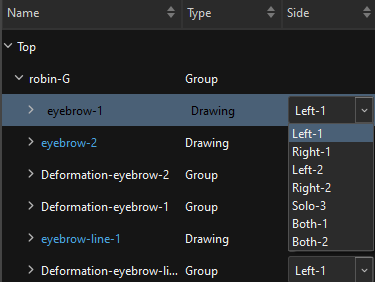
| Value | Meaning |
|---|---|
Left-1 |
Driven by page 1's left grid |
Right-2 |
Driven by page 2's right grid |
Both-3 |
Driven by both grids of page 3 |
Solo-1 |
Page 1 is solo; there is only one grid |
Mixed |
A group whose deform curves disagree — shown for information, never chosen |
A look-at's peg and deform lists add one more, Orphan, for a side dropped by a solo pair — see Look-At. A pose layer never shows it.
A solo page contributes only its Solo-N entry — no Left, Right or Both for that number.
Re-pick a side even when it already reads right
A row that inherits its side from its group displays that side. Selecting the same value again still commits it, and that matters: an inherited Both on a mirrored rig averages the left and right and can cancel out to the rest pose. If a target looks inert, set its side explicitly.
Cascade
Deform chains resolve their side in one direction:
curve → group → target
A curve that says nothing inherits its group's side; a group that says nothing inherits the target's. Rows display the resolved value, so a row never lies about which grid drives it. An inherited value is drawn dimmed; setting one makes it solid.
Assigning several at once
Select multiple rows and change one Side combo — the change cascades to the whole selection.
Mirror
Mirror X and Mirror Y in the layer header decide how the twin grid of a pair follows the one you are dragging.
| Flips | |
|---|---|
| X (default on) | Left/right — the standard lateral symmetry |
| Y | Top/bottom — for lid/lip pairs |
| Both off | The twin is an identical copy, not a mirror |
The axes belong to the whole layer, not to a page — rigging is symmetric, and a pair whose mirror axis differed from its sibling's would be a bug, not a feature.
Set the mirror axes before you author
Authoring a snap writes it to the twin grid as well, but the twin's snap is flipped through these axes. With Mirror X on, keying R0C0 on the left writes the right grid's R0C6 — not its R0C0.
That means the axes in force at the moment you author are baked into where those frames sit, and changing the axes afterwards does not re-map the keys you already made. A layer authored with Mirror X on, then switched off and re-paired, will take new keys on different snaps than its old ones.
Changing a mirror axis on an empty layer costs nothing. On an authored one it is a decision, not an accident: it is also the deliberate way to reverse how the twin grid reads. Just expect the keys you already made to stay where they are — only new authoring follows the new axis.
In the composed rig, the animator gets two runtime toggles:
| Toggle | Effect |
|---|---|
| Mirror | Within a pair — whichever handle moved last drives its twin. |
| Mirror All | Across pairs — moving one pair drives every sibling pair too. Only appears when some layer actually holds two or more paired pages. |
Mirror All forces Mirror on while it is active.
Flip Sides
The ⇄ button in the Targets toolbar swaps Left ↔ Right within the same page number: Left-1 becomes Right-1, Right-2 becomes Left-2. Both-N and Solo-N are untouched.
It flips stored side values only — never node paths, never keyframes, never poses. It is the fix for a target list that got built the wrong way round.
On a layer with no pair, the button is disabled with the reason, not hidden: "Flip Sides — this layer has no L/R pair (solo grids have no sides to flip)."
The look-at's peg and deform lists carry the same button.
Copy & Paste Sides
Right-click a target row in the target list:
| Item | Copies |
|---|---|
Copy Side (L) |
Just that row's side |
Copy Sides (7 curves) |
The row's whole side pattern, curve by curve |
Paste Sides |
Applies the pattern |
Paste Sides Mirrored |
Applies it with L and R swapped |
The scope is in the label, never in whether the row is folded. With hundreds of targets you collapse groups to fit the screen, not to declare intent — the fold only decides which item comes bold as the default.
An incompatible clipboard shows Paste disabled with the reason as its tooltip, never a silent partial paste. The guard is structural: same group count, same curve count per group, same module sequence.
The clipboard survives switching layers, and survives the source target being deleted.
Share Sides
That is a control feature, not a layer one — it makes a control's Back face reuse the Front's extreme columns. See Controls → Share Sides.
Related
- Pose Layers
- Targets — the list the Side column lives in
- Grids & Snaps